

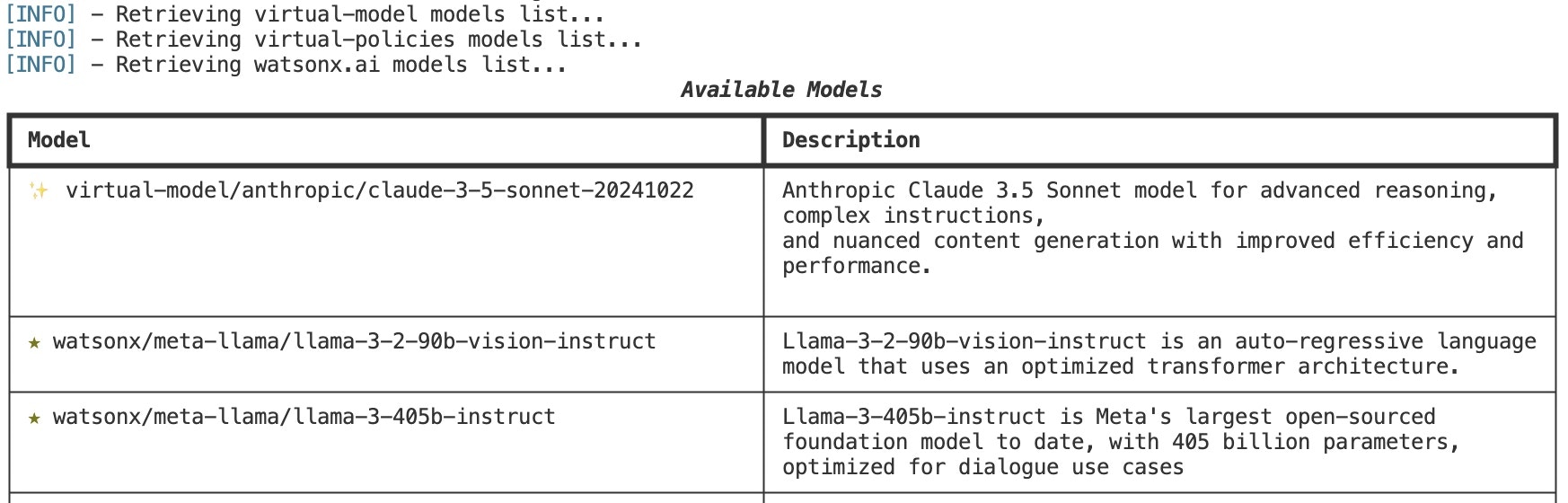
watsonx.ai Models
The SaaS and Developer Edition variants of watsonx Orchestrate platform comes out of the box with all LLM chat models available within watsonx.ai. These models come with your entitlement [1]. While all models are available only a small number of models are marked as preferred. These appear with a ★ next to their name when you run the orchestrate models list command. Only preferred models appear as supported in the Manage Agents page in the UI. Preferred models are models which have undergone evaluation and have been determined to work well with the watsonx Orchestrate platform. On-premises models hosted via watsonx.ai Inference Frameworks Manager (IFM) within watsonx Orchestrate will also show up in this list.AI Gateway
virtual-models
The watsonx Orchestrate platform includes the AI Gateway, which lets you expose models from your preferred provider to watsonx Orchestrate. These models can be added to watsonx Orchestrate via the ADK and will be automatically made available to all users of the watsonx Orchestrate platform. [2] While it may be possible to add any model in this way, only models which support tool calling will work with watsonx Orchestrate. Models added via the AI gateway are not validated for compatibility with watsonx Orchestrate, unlike the preferred models from watsonx.ai. *Using a virtual model may occur additional cost from the upstream provider.virtual-policies
In addition to adding models, it is possible to configure complex routing rules with you LLMs. Use virtual-policies to establish pseudo-LLM names which can load balance traffic between models or establish fallback policies for when a provider is experiences an outage.[1] In the Developer Edition of watsonx Orchestrate, when a
WO_INSTANCE and WO_API_KEY is provided in
the users .env file, if that instance is a SaaS instance, all LLM requests will be proxied through
watsonx Orchestrate without the user needing an additional watsonx.ai entitlement.If the instance is CPD, and a WO_INSTANCE AND WO_API_KEY is provided, only models deployed via
IFM will be available via the watsonx/ prefix.If neither of the above apply, either provide a WATSONX_SPACE_ID and WATSONX_APIKEY to a watsonx.ai account
hosted in us-south, or add a model to the AI gateway running within your local Developer Edition server.[2] virtual-models and virtual-policies added to a SaaS or CPD instance of watsonx Orchestrate will not automatically
be available within the Developer Edition. They will need to be manually added by the user.Next steps
Managing the AI gateway
Learn how to manage your AI Gateway LLMs by using the ADK’s CLI.
Model policies
Learn how to create and manage model policies for complex LLM routing and fallback.
Examples with supported providers
See how to add OpenAI, Azure, AWS Bedrock, Ollama, and many more models from different providers.
Integrate the Developer Edition with SaaS
Learn how to integrate the watsonx Orchestrate Developer Edition with your watsonx Orchestrate SaaS tenant for LLM inferencing.