

Deploy your agent to Slack workspaces using your own Slack app.Documentation Index
Fetch the complete documentation index at: https://developer.watson-orchestrate.ibm.com/llms.txt
Use this file to discover all available pages before exploring further.
Prerequisites
- A Slack workspace with admin access
- A Slack app that is created in your workspace
-
Slack API credentials:
- Client ID
- Client Secret
- Signing Secret
- Bot User OAuth Token for each team or workspace
-
Slack Team ID (starts with the letter ‘T’)
- Locate your team ID in the URL of the
Workflow Stepstab in your Slack app settings
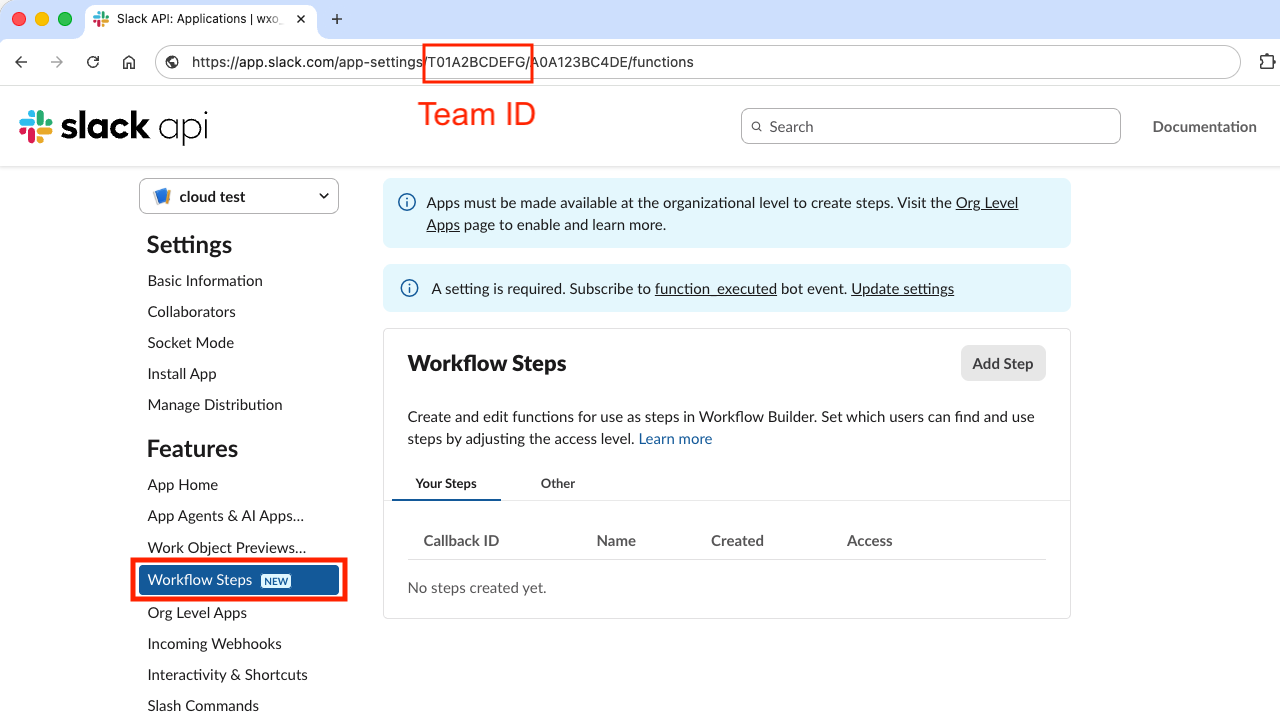
- Locate your team ID in the URL of the
-
Slack Bot Token Scopes:
- app_mentions:read
- chat:write
- im:history
- im:write
- users.profile:read
-
Subscribed to following Bot Events:
- message.im
- app_mention
Create a Slack channel
Using YAML:YAML
Python
Configuration requirements
| Field | Required | Format | Description |
|---|---|---|---|
client_id | Yes | String | Slack API client ID |
client_secret | Yes | String | Slack API client secret |
signing_secret | Yes | String | Slack API signing secret |
teams | Yes | Array of SlackTeam objects | Slack teams or workspaces |
teams[].id | Yes | String | Slack team or workspace ID |
teams[].bot_access_token | Yes | String | Bot user OAuth token |

