

Note: “Flow” refers to wxO Agentic Workflow
Overview
Flow (wxO Agentic Workflow) is a specialized orchestration tool in watsonx Orchestrate that sequences the execution of Agents, Tools, and People interactions. Understanding Flow’s performance characteristics helps you design efficient workflows and set appropriate expectations.What is Flow?
Flow (wxO Agentic Workflow) orchestrates:- Agents: For reasoning and complex decision-making
- Tools: Python tools, Langflow tools, and other execution units
- People: User interactions, approvals, and forms
- Data: Mapping and transformation between tasks
Key Characteristics
- Stateful: Maintains context across tasks
- Resumable: Can pause and resume execution
- Auditable: Complete execution traces
- Scalable: Auto-scales for concurrent executions
- Observable: Rich monitoring and tracing
Flow as an Orchestration Tool
When to Use Flow
Use Flow When:
- Orchestrating multiple tools in sequence or in parallel
- Coordinating agents with tools and people
- Managing complex, multi-step workflows
- Requiring state persistence and resumability
- Handling user interactions and approvals
Flow Performance Characteristics
Key Performance Insights
Flow performance consists of several components:-
Orchestration Overhead: Minimal and predictable (< 100ms)
- Initialization time is very fast
- Per-task transition overhead is consistent
- Scales linearly with task count
- Represents a small fraction of total execution time
-
Task Execution Time: Dominates total duration
- Simple operations: Very fast
- Complex computations: Moderate to slow
- External API calls: Variable based on network and service
- LLM interactions: Moderate to slow depending on complexity
-
Data Mapping: Negligible with explicit mapping
- Explicit mapping (default): Extremely fast
- Auto-mapping with LLM: Slower but flexible
- Context compression: Automatic when needed, adds latency, applicable for flows with large context
-
User Interactions: Highly variable
- Can range from seconds to hours
- Often dominates total flow duration
- Optimization focuses on user experience
Flow Execution Time Components
Total flow execution time consists of multiple independent components:1. Flow Orchestration Overhead
This is the fixed cost of flow execution, independent of task complexity. Components:- Initialization: Flow context setup, variable initialization, first task preparation
- Inter-task Coordination: Result processing, context updates, next task preparation
- Completion: Result aggregation, cleanup, response formatting
- Minimal and predictable
- Scales linearly with task count
- Represents small fraction of total time for most flows
- Negligible compared to actual work time
2. Tool & Agent Execution Time
This is the actual work time and varies significantly based on: Tool Complexity:- Simple string operations: Very fast
- Complex computations: Moderate to slow
- External API calls: Variable (network and service dependent)
- Simple agent tasks: Moderate (includes LLM overhead)
- Complex reasoning: Slower (multiple LLM calls)
- Multiple tool uses: Slowest (iterative problem-solving)
Performance Considerations for Large Data
Document Handling:- Binary documents via API: When sending large documents as binary-encoded data, Flow stores them in S3 first, adding storage overhead
- Document references: Flow optimizes by passing document references rather than full content
- Recommendation: For large documents, use document references or pre-upload to storage when possible
- Large responses: Tools/agents returning large content can impact performance
- Processing overhead: Flow must process, store, and potentially pass large data between tasks
- Context compression: May trigger automatic context compression
- Recommendation: Design tools to return summaries or references rather than full content
LLM-Based Features in Flows
Flows can leverage LLMs through multiple features: A. Generative Prompt (Direct LLM Call)- Performance: Faster than agent interactions
- Use case: Direct text generation, transformation, or analysis
- Characteristics: Single LLM inference call, no agent loop overhead
- Performance: Moderate to slow (depends on document complexity)
- Use case: Document extraction, text extraction, document classification
- Characteristics: LLM-based analysis, duration varies with document complexity
- Performance: Slower due to reasoning loop
- Use case: Complex reasoning, tool use, multi-step problem solving
- Characteristics: Multiple LLM calls, iterative problem-solving, higher latency but more capable
3. User Activity Wait Time
When flows include user interactions (forms, approvals, confirmations):- Immediate response: Very fast (user reading and clicking)
- Typical response: Moderate (user reviewing and deciding)
- Delayed response: Slow (user away from keyboard)
Key Insight: Flow’s minimal initialization overhead means user-facing interactions can be surfaced almost immediately after flow start, providing excellent responsiveness for interactive workflows.
4. Data Mapping Time
Data mapping between task outputs and inputs:- Explicit mapping: Extremely fast (direct field assignments, recommended when latency is a concern)
- Auto-mapping with LLM: Slower but make programming Flow very simple (requires LLM inference for schema transformation)
- Context compression: Slower (automatic LLM-based summarization when needed)
- Every task transition (explicit mapping is default and fast)
- Auto-mapping only when explicitly configured for complex transformations
- Context compression automatically triggered when flow context exceeds token threshold
5. Agent Context Retrieval Time
Agent conversation history retrieval at flow start:- Default retrieval: Moderate (fetches last N conversation turns)
- Bypassed: No overhead (when conditions below are met)
- Flow invoked via API endpoint
- Flow invoked via MCP (Model Context Protocol)
- Configuration set to 0 turns
- Flow not associated with an agent conversation
- Minimize Task Count: Combine related operations, batch processing, use parallel execution when possible
- Optimize Tool Logic: Efficient algorithms, minimize I/O, cache results, batch operations
- Choose Data Mapping Strategy:
- Explicit mapping (fast): For production and time-sensitive flows
- Auto-mapping (slower): For development and dynamic schemas
- Migrate from auto-mapping to explicit mapping as flows mature
- Optimize Agent Context: Set appropriate turn limits, use 0 for stateless flows, invoke via API/MCP to bypass retrieval
- Optimize LLM Interactions: Use Generative Prompts for simple tasks, Agents only when reasoning needed
- Optimize User Interactions: Pre-fill forms, provide defaults, clear instructions
Flow Optimization Strategies
Minimize Task Count
Combine related operations, batch processing, use parallel execution when possible
Optimize Tool Logic
Efficient algorithms, minimize I/O, cache results, batch operations
Choose Data Mapping Strategy
Use explicit mapping for production, auto-mapping for development
Optimize Agent Context
Set appropriate turn limits, use 0 for stateless flows
Measuring Flow Performance
How to Measure Flow Performance
- Flow Inspector (Visual)
- APIs (Programmatic)
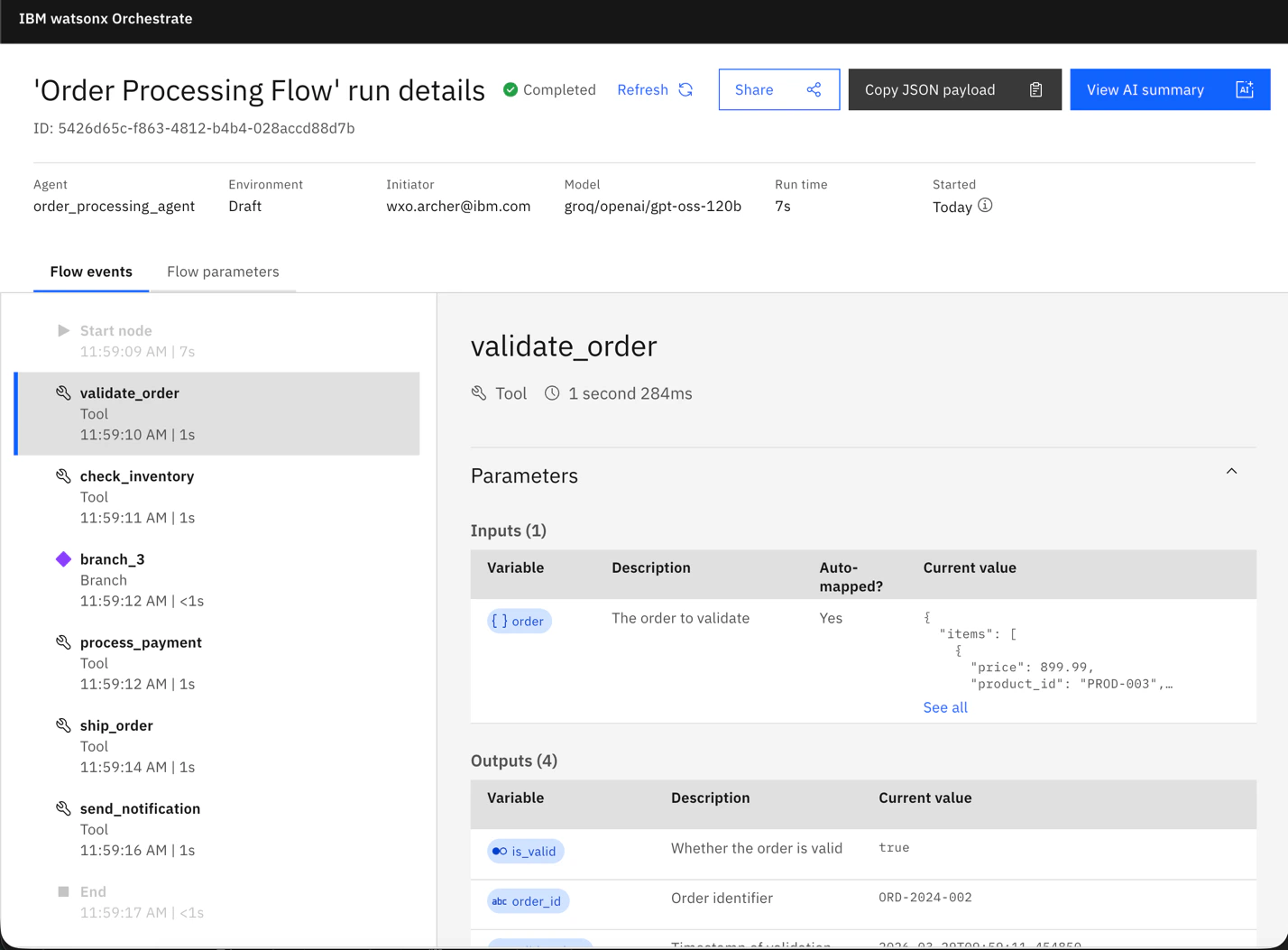
Use the Flow Inspector to visually inspect flow execution and timing data:
- View execution history and traces
- See timing data for each task
- Analyze flow performance visually
-
Identify bottlenecks in the workflow
Performance Analysis Tips
1
Run multiple iterations
At least 3-5 runs for consistency
2
Consider cold vs warm starts
First run may include initialization
3
Monitor system resources
CPU, memory, network can affect results
4
Test under load
Performance may degrade with concurrent flows
5
Isolate components
Compare task durations to identify bottlenecks
Summary
Key Points
Key Points
- Flow orchestration overhead is minimal and predictable
- Tool/Agent execution dominates total time
- User interactions can dominate when present
- Use explicit data mapping for production (fast)
- Measure with traces to identify bottlenecks
Optimization Priority
Optimization Priority
- Choose appropriate LLM interaction type (Generative Prompt vs Agent)
- Optimize tool execution and external API calls
- Optimize user interactions
- Use explicit data mapping in production
- Optimize agent context retrieval for stateless flows
Related Guides
Main Performance Guide
Comprehensive performance guide overview
Agent Performance Guide
Agent-specific performance optimization
Tool Performance Guide
Tool execution performance guide