

1
Open Bob or Visual Studio Code
Launch Bob or VS Code on your computer.
2
Open the extensions tab
Press
Ctrl + Shift + X or click the extensions icon on the sidebar to open the extensions marketplace.3
Search for the extension
Type “watsonx Orchestrate ADK” in the search bar.
4
Install the extension
Click on the watsonx Orchestrate ADK extension from the results and click Install.
5
Click Initialize Workspace
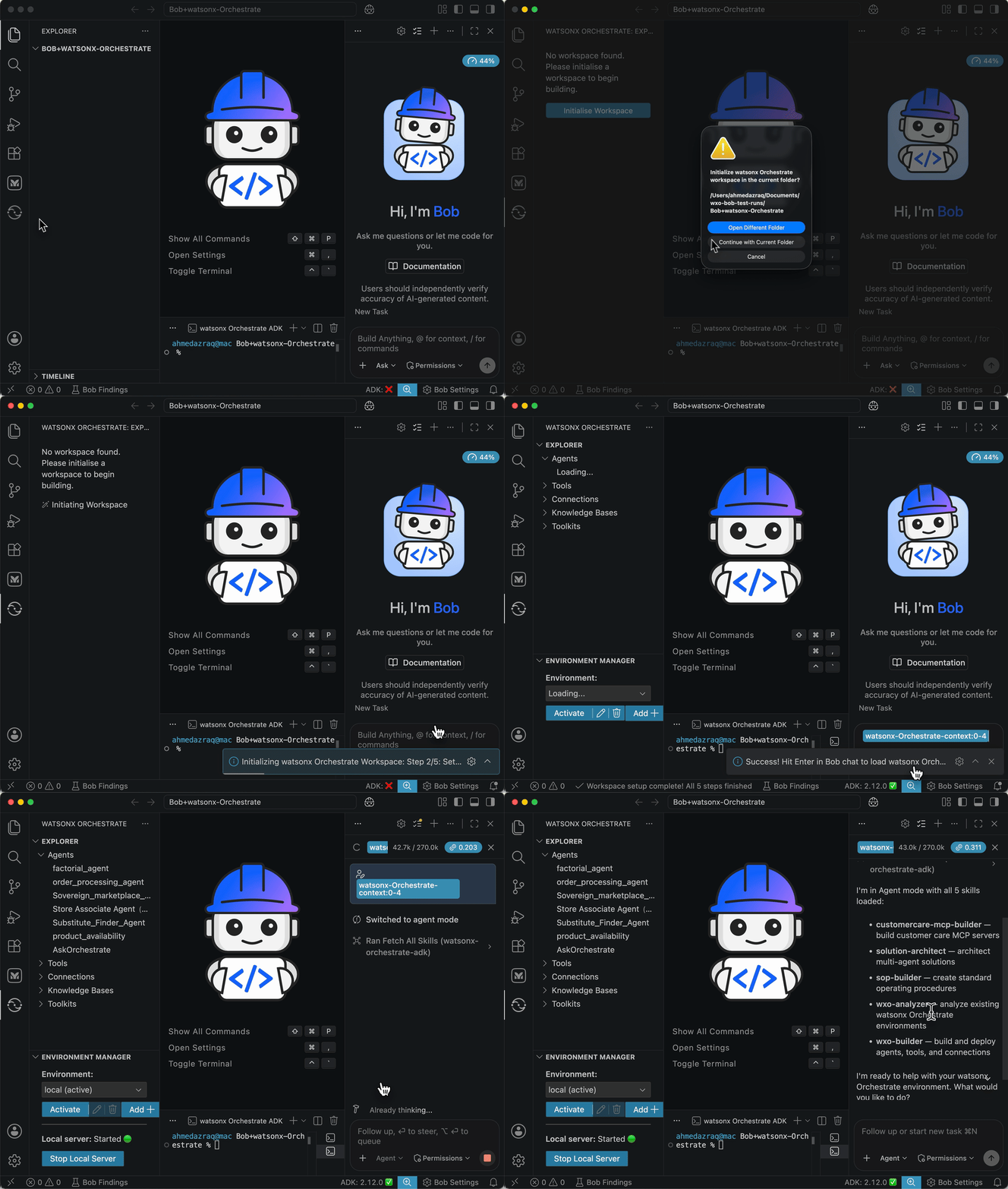
Automated Workspace Setup
Clicking “Initialize Workspace” handles the entire setup automatically:- Environment check: Detects an existing healthy environment and skips redundant work. Corrupted virtual environments are cleaned up automatically.
- **Python and ADK setup: Installs
uvif absent (with your consent), creates a Python 3.12 virtual environment, then installs or upgrades the ADK. - MCP servers: Detects your IDE (Bob, Cursor, or VS Code Copilot) and configures two MCP servers automatically. Use the Install MCP Servers and Update MCP Servers commands to re-run this step at any time.
- watsonx-orchestrate-adk: manage agents, tools, toolkits, knowledge bases, connections, models, and channels on your live watsonx Orchestrate environment.
- watsonx-orchestrate-adk-docs: searchable ADK reference docs, guides, and API specs directly in your editor.
- Environment activation: Activates your local ADK environment or connects to a SaaS environment automatically. A single API key prompt is shown only when connecting to a remote cluster.
Initialize Workspace on IBM Bob
In Bob IDE, “Initialize Workspace” runs all 4 steps plus a fifth step exclusive to Bob to load a curated set of watsonx Orchestrate skills. The skills cover the full development lifecycle: from solution architecture to agent implementation to documentation. Once the workspace is ready, a context is pre-loaded in the Bob chat. Hit Send Message to load your skills and start building.Next steps
After installing the watsonx Orchestrate ADK extension in Visual Studio Code, you can preview the webchat embed and manage environment settings directly from VS Code.- Use the webchat embed panel to see how the chat interface will appear in your application. For more information, see Web chat embed.
- Configure the Environment Switcher to toggle between development, staging, and production environments. This ensures that your integration is tested and deployed in the correct context before going live. For more information, see VS Code environment switcher.