> ## Documentation Index
> Fetch the complete documentation index at: https://developer.watson-orchestrate.ibm.com/llms.txt
> Use this file to discover all available pages before exploring further.
# Flow Performance Guide
> Understanding, measuring, and optimizing Flow (wxO Agentic Workflow) performance in watsonx Orchestrate
**Part of**: [watsonx Orchestrate Performance Guide](./performance-guide-v2)
**Performance Testing Approach**
This guide focuses on **how to measure and optimize** Flow (wxO Agentic Workflow) performance. Performance varies significantly based on workload, configuration, system load, and network conditions. Always measure in your own environment.
**Note**: "Flow" refers to wxO Agentic Workflow
## Overview
Flow (wxO Agentic Workflow) is a **specialized orchestration tool** in watsonx Orchestrate that sequences the execution of Agents, Tools, and People interactions. Understanding Flow's performance characteristics helps you design efficient workflows and set appropriate expectations.
### What is Flow?
Flow (wxO Agentic Workflow) orchestrates:
* **Agents**: For reasoning and complex decision-making
* **Tools**: Python tools, Langflow tools, and other execution units
* **People**: User interactions, approvals, and forms
* **Data**: Mapping and transformation between tasks
### Key Characteristics
* **Stateful**: Maintains context across tasks
* **Resumable**: Can pause and resume execution
* **Auditable**: Complete execution traces
* **Scalable**: Auto-scales for concurrent executions
* **Observable**: Rich monitoring and tracing
***
## Flow as an Orchestration Tool
### When to Use Flow
**Use Flow When:**
* Orchestrating multiple tools in sequence or in parallel
* Coordinating agents with tools and people
* Managing complex, multi-step workflows
* Requiring state persistence and resumability
* Handling user interactions and approvals
**Consider Alternatives When:**
* Single tool execution is sufficient
* Agent can handle the task independently
***
## Flow Performance Characteristics
### Key Performance Insights
Flow performance consists of several components:
1. **Orchestration Overhead**: Minimal and predictable (\< 100ms)
* Initialization time is very fast
* Per-task transition overhead is consistent
* Scales linearly with task count
* Represents a small fraction of total execution time
2. **Task Execution Time**: Dominates total duration
* Simple operations: Very fast
* Complex computations: Moderate to slow
* External API calls: Variable based on network and service
* LLM interactions: Moderate to slow depending on complexity
3. **Data Mapping**: Negligible with explicit mapping
* Explicit mapping (default): Extremely fast
* Auto-mapping with LLM: Slower but flexible
* Context compression: Automatic when needed, adds latency, applicable for flows with large context
4. **User Interactions**: Highly variable
* Can range from seconds to hours
* Often dominates total flow duration
* Optimization focuses on user experience
***
## Flow Execution Time Components
Total flow execution time consists of multiple independent components:
```
Total Flow Duration =
Flow Orchestration Overhead +
Tool & Agent Execution Time +
User Activity Wait Time +
Data Mapping Time +
Agent Context Retrieval Time
```
### 1. Flow Orchestration Overhead
This is the **fixed cost** of flow execution, independent of task complexity.
**Components:**
* **Initialization**: Flow context setup, variable initialization, first task preparation
* **Inter-task Coordination**: Result processing, context updates, next task preparation
* **Completion**: Result aggregation, cleanup, response formatting
**Characteristics:**
* Minimal and predictable
* Scales linearly with task count
* Represents small fraction of total time for most flows
* Negligible compared to actual work time
### 2. Tool & Agent Execution Time
This is the **actual work time** and varies significantly based on:
**Tool Complexity:**
* Simple string operations: Very fast
* Complex computations: Moderate to slow
* External API calls: Variable (network and service dependent)
**Agent Interactions:**
* Simple agent tasks: Moderate (includes LLM overhead)
* Complex reasoning: Slower (multiple LLM calls)
* Multiple tool uses: Slowest (iterative problem-solving)
#### Performance Considerations for Large Data
**Document Handling:**
* **Binary documents via API**: When sending large documents as binary-encoded data, Flow stores them in S3 first, adding storage overhead
* **Document references**: Flow optimizes by passing document references rather than full content
* **Recommendation**: For large documents, use document references or pre-upload to storage when possible
**Large Content from Tools/Agents:**
* **Large responses**: Tools/agents returning large content can impact performance
* **Processing overhead**: Flow must process, store, and potentially pass large data between tasks
* **Context compression**: May trigger automatic context compression
* **Recommendation**: Design tools to return summaries or references rather than full content
#### LLM-Based Features in Flows
Flows can leverage LLMs through multiple features:
**A. Generative Prompt (Direct LLM Call)**
* **Performance**: Faster than agent interactions
* **Use case**: Direct text generation, transformation, or analysis
* **Characteristics**: Single LLM inference call, no agent loop overhead
**B. Document Processing Features (LLM-based)**
* **Performance**: Moderate to slow (depends on document complexity)
* **Use case**: Document extraction, text extraction, document classification
* **Characteristics**: LLM-based analysis, duration varies with document complexity
**C. Agent Interactions (with ReAct Loop)**
* **Performance**: Slower due to reasoning loop
* **Use case**: Complex reasoning, tool use, multi-step problem solving
* **Characteristics**: Multiple LLM calls, iterative problem-solving, higher latency but more capable
**Recommendation**: Use Generative Prompts for straightforward LLM tasks to minimize latency; use document processing features when analyzing documents; use Agents when reasoning and tool orchestration are needed.
### 3. User Activity Wait Time
When flows include user interactions (forms, approvals, confirmations):
* **Immediate response**: Very fast (user reading and clicking)
* **Typical response**: Moderate (user reviewing and deciding)
* **Delayed response**: Slow (user away from keyboard)
**Impact**: Can dominate total flow duration, making orchestration overhead negligible.
**Key Insight**: Flow's minimal initialization overhead means user-facing interactions can be surfaced almost immediately after flow start, providing excellent responsiveness for interactive workflows.
### 4. Data Mapping Time
Data mapping between task outputs and inputs:
* **Explicit mapping**: Extremely fast (direct field assignments, recommended when latency is a concern)
* **Auto-mapping with LLM**: Slower but make programming Flow very simple (requires LLM inference for schema transformation)
* **Context compression**: Slower (automatic LLM-based summarization when needed)
**When it occurs:**
* Every task transition (explicit mapping is default and fast)
* Auto-mapping only when explicitly configured for complex transformations
* Context compression **automatically triggered** when flow context exceeds token threshold
### 5. Agent Context Retrieval Time
Agent conversation history retrieval at flow start:
* **Default retrieval**: Moderate (fetches last N conversation turns)
* **Bypassed**: No overhead (when conditions below are met)
**When it's bypassed** (no overhead):
* Flow invoked via API endpoint
* Flow invoked via MCP (Model Context Protocol)
* Configuration set to 0 turns
* Flow not associated with an agent conversation
**Optimization Strategies:**
1. **Minimize Task Count**: Combine related operations, batch processing, use parallel execution when possible
2. **Optimize Tool Logic**: Efficient algorithms, minimize I/O, cache results, batch operations
3. **Choose Data Mapping Strategy**:
* **Explicit mapping** (fast): For production and time-sensitive flows
* **Auto-mapping** (slower): For development and dynamic schemas
* Migrate from auto-mapping to explicit mapping as flows mature
4. **Optimize Agent Context**: Set appropriate turn limits, use 0 for stateless flows, invoke via API/MCP to bypass retrieval
5. **Optimize LLM Interactions**: Use Generative Prompts for simple tasks, Agents only when reasoning needed
6. **Optimize User Interactions**: Pre-fill forms, provide defaults, clear instructions
***
## Flow Optimization Strategies
Combine related operations, batch processing, use parallel execution when possible
Efficient algorithms, minimize I/O, cache results, batch operations
Use explicit mapping for production, auto-mapping for development
Set appropriate turn limits, use 0 for stateless flows
***
## Measuring Flow Performance
### How to Measure Flow Performance
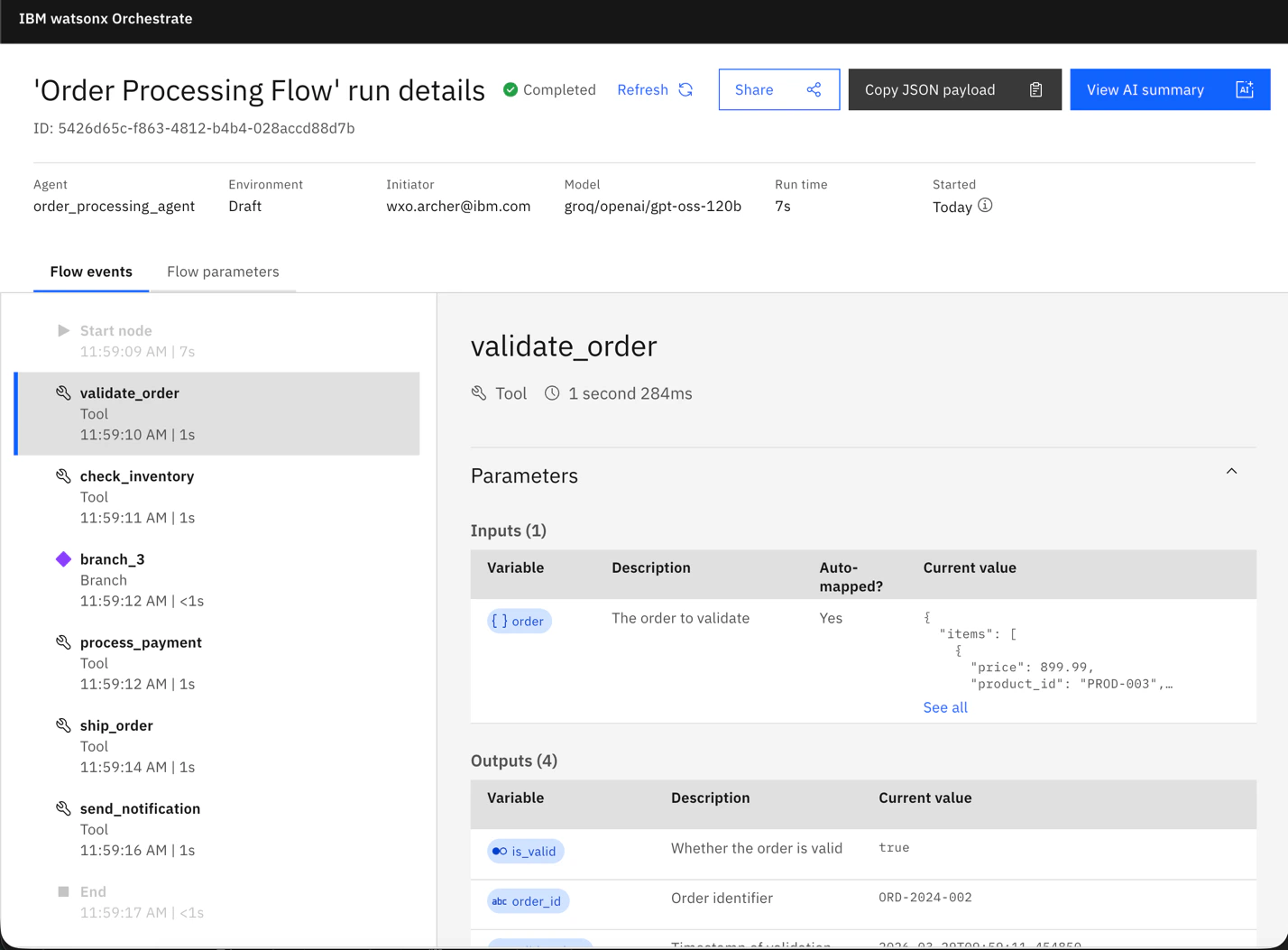
Use the [Flow Inspector](https://www.ibm.com/docs/en/watsonx/watson-orchestrate/base?topic=workflows-inspecting-agentic) to visually inspect flow execution and timing data:
* View execution history and traces
* See timing data for each task
* Analyze flow performance visually
* Identify bottlenecks in the workflow
 1. **Invoke flow directly** (not through an Agent)
* Use [Flow API](https://developer.ibm.com/apis/catalog/watsonorchestrate--custom-assistants/api/API--watsonorchestrate--flows#call_flow_v1_flows__flow_id__run_async_post) or [Flow MCP](https://developer.watson-orchestrate.ibm.com/tools/flows/mcp_workflows) (public preview)
* Avoid calling through Agent as it adds its own overhead
2. **Retrieve execution trace** after flow completion using the [trace API](https://www.ibm.com/docs/en/watsonx/watson-orchestrate/base?topic=agents-understanding-trace-details)
### Performance Analysis Tips
At least 3-5 runs for consistency
First run may include initialization
CPU, memory, network can affect results
Performance may degrade with concurrent flows
Compare task durations to identify bottlenecks
***
## Summary
* Flow orchestration overhead is minimal and predictable
* Tool/Agent execution dominates total time
* User interactions can dominate when present
* Use explicit data mapping for production (fast)
* Measure with traces to identify bottlenecks
1. Choose appropriate LLM interaction type (Generative Prompt vs Agent)
2. Optimize tool execution and external API calls
3. Optimize user interactions
4. Use explicit data mapping in production
5. Optimize agent context retrieval for stateless flows
***
## Related Guides
Comprehensive performance guide overview
Agent-specific performance optimization
Tool execution performance guide
***
## API References
* [Flow API](https://developer.ibm.com/apis/catalog/watsonorchestrate--custom-assistants/api/API--watsonorchestrate--flows#call_flow_v1_flows__flow_id__run_async_post)
1. **Invoke flow directly** (not through an Agent)
* Use [Flow API](https://developer.ibm.com/apis/catalog/watsonorchestrate--custom-assistants/api/API--watsonorchestrate--flows#call_flow_v1_flows__flow_id__run_async_post) or [Flow MCP](https://developer.watson-orchestrate.ibm.com/tools/flows/mcp_workflows) (public preview)
* Avoid calling through Agent as it adds its own overhead
2. **Retrieve execution trace** after flow completion using the [trace API](https://www.ibm.com/docs/en/watsonx/watson-orchestrate/base?topic=agents-understanding-trace-details)
### Performance Analysis Tips
At least 3-5 runs for consistency
First run may include initialization
CPU, memory, network can affect results
Performance may degrade with concurrent flows
Compare task durations to identify bottlenecks
***
## Summary
* Flow orchestration overhead is minimal and predictable
* Tool/Agent execution dominates total time
* User interactions can dominate when present
* Use explicit data mapping for production (fast)
* Measure with traces to identify bottlenecks
1. Choose appropriate LLM interaction type (Generative Prompt vs Agent)
2. Optimize tool execution and external API calls
3. Optimize user interactions
4. Use explicit data mapping in production
5. Optimize agent context retrieval for stateless flows
***
## Related Guides
Comprehensive performance guide overview
Agent-specific performance optimization
Tool execution performance guide
***
## API References
* [Flow API](https://developer.ibm.com/apis/catalog/watsonorchestrate--custom-assistants/api/API--watsonorchestrate--flows#call_flow_v1_flows__flow_id__run_async_post)