> ## Documentation Index
> Fetch the complete documentation index at: https://developer.watson-orchestrate.ibm.com/llms.txt
> Use this file to discover all available pages before exploring further.
# Creating connections
Connections are composed of three parts:
1. **Application ID (`app_id`)**: A unique identifier that distinguishes the connection within your environment.
2. **Environment-specific configuration**: Define separate configurations for the **draft** and **live** states of an agent. Each configuration specifies:
* The type of credentials used (for example, Basic Auth, Bearer Token, API Key)
* Whether the credentials are scoped to individual users (`member`) or shared across the organization (`team`)
3. **Credentials**:
* For **team connections**, builders set the credentials, and all users share them across the instance.
* For **member connections**, users are prompted in the chat to enter their credentials if they haven’t already provided them.
# Adding and configuring connections
You can add and configure connections in two ways:
* Use a combination of the `connections add` and `connections configure` commands to define and set up connections manually.
* Import connections from a YAML file, just like other watsonx Orchestrate resources.
You can create and import connection configurations using YAML files, which makes it easier to share setup details across users. However, you must set credentials separately using the CLI. This requirement helps prevent storing sensitive information like passwords in unsecured files.
In your YAML specification file, define the connection’s structure, including:
* Application ID (`app_id`)
* Authentication type
* Environment-specific settings (e.g., draft vs. live)
* Credential scope (`member` or `team`)
```yaml YAML theme={null}
spec_version: v1
kind: connection
app_id: my_app
resource:
component: knowledge
category: milvus
environments:
draft: # in draft each person needs to provide their own basic credentials
kind: basic
type: team
server_url: https://example.com/
custom_config_entries: # Optional
key1: value1
key2: value2
live:
kind: api_key # note it's possible to auth different in the deployed live agent vs the draft agent
type: member
server_url: https://example.com/
```
Defines the schema version of the file. The ADK uses this value to manage in-place upgrades or display warnings when breaking changes prevent an upgrade.
*Possible Values*: `v1`
Specifies the type of configuration. For connection configurations, this value is always connection.
*Possible Values*: `connection`
The unique name of the application this connection integrates with (e.g., box, tavily, github). Use only alphanumeric characters and underscores.
Additional resources for the connection.
An optional component associated with this connection, such as knowledge or registry.
An optional category for the component, such as milvus for a knowledge component.
The configuration of each of the **draft** and **live** environments.
The configuration of the **draft** environment.
The kind of credentials to use for the connection in this environment, note this can differ per environment.
*Possible values: `basic`, `bearer`, `api_key`, `oauth_auth_code_flow`, `oauth_auth_implicit_flow`, `oauth_auth_password_flow`, `oauth_auth_client_credentials_flow`, `oauth_auth_on_behalf_of_flow`, `key_value`*
Whether these credentials for the connection in this environment should be shared by all
users (`team`), or provided by each user (`member`).
*Possible values: `team`, `member`*
The base URL of the server this application is associated with (if any). In the case of oauth connections, this may differ
from the token URL which is provided via the credentials themselves.
Only set to true for `oauth_auth_on_behalf_of_flow` connections. When this is true, the
connection will be done through an Identity Provider (IDP).
To configure headers and body parameters to an IDP provider when the connection `type` is `oauth_auth_on_behalf_of_flow`.
A set of key value pairs to send as headers to the upstream IDP provider.
A set of key value pairs to send as the body to the upstream IDP provider.
A collection of headers to send to the token URL of an oauth\_\* flow.
A set of key value pairs to send as headers to the token provider.
Optional custom values key value pairs to be exposed to the connection. Works with all connection kinds.
Configuration for the live environment. This setting is ignored in watsonx Orchestrate Developer Edition because it does not include a live environment.
The kind of credentials to use for the connection in this environment, note this can differ per environment.
*Possible values: `basic`, `bearer`, `api_key`, `oauth_auth_code_flow`, `oauth_auth_implicit_flow`, `oauth_auth_password_flow`, `oauth_auth_client_credentials_flow`, `oauth_auth_on_behalf_of_flow`, `key_value`*
Whether these credentials for the connection in this environment should be shared by all
users (`team`), or provided by each user (`member`).
*Possible values: `team`, `member`*
The base URL of the server this application is associated with (if any). In the case of oauth connections, this may differ
from the token URL which is provided via the credentials themselves.
Only set to true for `oauth_auth_on_behalf_of_flow` connections. When this is true, the
connection will be done through an Identity Provider (IDP).
To configure headers and body parameters to an IDP provider when the connection `type` is `oauth_auth_on_behalf_of_flow`.
A set of key value pairs to send as headers to the upstream IDP provider.
A set of key value pairs to send as the body to the upstream IDP provider.
A collection of headers to send to the token URL of an oauth\_\* flow.
A set of key value pairs to send as headers to the token provider.
Optional custom values key value pairs to be exposed to the connection. Works with all connection kinds.
**To import this connection, run:**
```bash BASH theme={null}
orchestrate connections import -f my_app.yaml
```
### Example connection configuration files per type
A Basic connection contains two secure fields (`username` and `password`), and one insecure field (`server_url`).
```yaml my_app.yaml theme={null}
spec_version: v1
kind: connection
app_id: my_app
environments:
draft: # in draft each person needs to provide their own basic credentials
kind: basic
type: team
server_url: https://example.com/
live:
kind: basic
type: team
server_url: https://example.com/
```
An Bearer connection contains one secure field called a `token`, and one insecure field for the `server_url`.
```yaml my_app.yaml theme={null}
spec_version: v1
kind: connection
app_id: my_app
environments:
draft: # in draft each person needs to provide their own basic credentials
kind: bearer
type: team
server_url: https://example.com/
live:
kind: bearer
type: team
server_url: https://example.com/
```
An API key connection contains one secure field called an `api_key`,
and one insecure field for the `server_url`.
```yaml my_app.yaml theme={null}
spec_version: v1
kind: connection
app_id: my_app
environments:
draft: # in draft each person needs to provide their own basic credentials
kind: api_key
type: team
server_url: https://example.com/
live:
kind: api_key
type: team
server_url: https://example.com/
```
Key-value connections allow you to pass an arbitrary set of keys and values to upstream providers. These connections are especially useful in Python tools when you need secure configuration options that don't fit into standard authentication categories.
You can also use key-value connections to securely inject environment variables into MCP servers, enabling flexible and secure runtime configuration.
```yaml my_app.yaml theme={null}
spec_version: v1
kind: connection
app_id: my_app
environments:
draft:
kind: key_value
type: team
live:
kind: key_value
type: team
```
OAuth Auth Code Flows provide a downstream service a field called an `access_token` which can
be used used as an Bearer token by your tool.
```yaml **my_app.yaml** theme={null}
spec_version
kind: connection
app_id: my_app
environments:
draft:
kind: oauth_auth_code_flow
type: team
server_url: https://example.com/
live:
kind: oauth_auth_code_flow
type: team
server_url: https://example.com/
```
OAuth Implicit Flows provide a downstream service a field called an `access_token` which can
be used used as an Bearer token by your tool.
```yaml **my_app.yaml** theme={null}
spec_version
kind: connection
app_id: my_app
environments:
draft:
kind: oauth_auth_implicit_flow
type: team
server_url: https://example.com/
live:
kind: oauth_auth_implicit_flow
type: team
server_url: https://example.com/
```
OAuth Auth Password Flows provide a downstream service a field called an `access_token` which can
be used used as an Bearer token by your tool.
```yaml **my_app.yaml** theme={null}
spec_version
kind: connection
app_id: my_app
environments:
draft:
kind: oauth_auth_password_flow
type: team
server_url: https://example.com/
live:
kind: oauth_auth_password_flow
type: team
server_url: https://example.com/
```
OAuth Auth Client Flows provide a downstream service a field called an `access_token` which can
be used used as an Bearer token by your tool.
```yaml my_app.yaml theme={null}
spec_version
kind: connection
app_id: my_app
environments:
draft:
kind: oauth_auth_client_credentials_flow
type: team
server_url: https://example.com/
live:
kind: oauth_auth_client_credentials_flow
type: team
server_url: https://example.com/
```
Use an Oauth auth direct access flow connection to configure direct access for a team member in the draft environment.
Configure the connection with:
`orchestrate connections configure --app-id direct --environment draft --type-member --kind oauth_auth_direct_access_flow --sso --server-url=url`.
OAuth Token Exchange enables a one-time token exchange between an identity provider (IDP) and a downstream service on behalf of a user. Unlike the full on-behalf-of flow, this approach is optimized for scenarios where only a single delegated request is needed, reducing overhead while maintaining secure access.
This feature is ideal for lightweight integrations or actions that require temporary, delegated authentication without establishing a persistent session.
```yaml my_app.yaml theme={null}
spec_version: "v1"
kind: "connection"
app_id: my_app
environments:
draft:
kind: oauth_auth_token_exchange
type: member
sso: true
server_url: www.example.com
app_config:
header:
content-type: application/x-www-form-urlencode
```
OAuth on-behalf-of flows authenticate against an identity provider that can issue tokens to downstream services on behalf of a user. This enables secure, delegated access to external systems.
Currently, watsonx Orchestrate supports these flows only for agents accessed through embedded web chat.
```yaml YAML theme={null}
spec_version: v1
kind: connection
app_id: workdaysso
environments:
draft:
kind: oauth_auth_on_behalf_of_flow
type: member
sso: true
server_url: https://TBD.workday.com/ccx
idp_config:
header:
content-type: application/x-www-form-urlencoded
body:
requested_token_use: on_behalf_of
requested_token_type: urn:ietf:params:oauth:token-type:saml2
app_config:
header:
content-type: application/x-www-form-urlencode
live:
kind: oauth_auth_on_behalf_of_flow
type: member
sso: true
server_url: https://TBD.workday.com/ccx
idp_config:
header:
content-type: application/x-www-form-urlencoded
body:
requested_token_use: on_behalf_of
requested_token_type: urn:ietf:params:oauth:token-type:saml2
app_config:
header:
content-type: application/x-www-form-urlencoded
```
You can create and manage connections directly from the CLI.
Start by adding the connection using the following command. This registers the connection in watsonx Orchestrate and makes it visible in both the **Connections Manager UI** and the `orchestrate connections list` command:
```bash BASH theme={null}
orchestrate connections add -a
```
An app ID for the connection you want to create. This value uniquely identifies the connection when associating it with tools or agents.
An optional component associated with this connection, such as knowledge or registry.
An optional category for the component, such as milvus for a knowledge component.
At this point, the connection is registered and can be referenced by agents and tools. However, it won’t be usable until you configure it and set credentials.
Use the `configure` command to define the connection’s environment, credential scope, and authentication type:
```bash BASH theme={null}
orchestrate connections configure -a --env draft -t team -k basic
orchestrate connections configure -a --env live -t team -k basic
```
Optional. Custom configuration options for the connection. Should be set in the form `key=value`. Multiple values can be passed using `-e key1=value1 -e key2=value2`.
Required. The app ID to configure.
Required. The environment to configure. Accepted values: `draft` or `live`.
Required. The type of credentials.
* `team`: Credentials apply to all users.
* `member`: Each user provides individual credentials.
Required. The kind of credentials used by the connection. Accepted values include:\
`basic`, `bearer`, `api_key`, `oauth_auth_code_flow`, `oauth_auth_password_flow`, `oauth_auth_client_credentials_flow`, `oauth_auth_on_behalf_of_flow`, `oauth_auth_token_exchange_flow`, `key_value`, `kv`.
Optional. The URL that the connection uses to access the target service.
Optional. Specifies whether OAuth requires a SAML provider. Applies only to OAuth credential types.
Optional. The OAuth token use for the identity provider. Applies only to OAuth types with SSO.
Optional. The OAuth token type for the identity provider. Applies only to OAuth types with SSO.
Optional. Header values for the identity provider token request. Defaults to `content-type: application/x-www-form-urlencoded`.\
Multiple values can be set, for example:\
`--idp-token-header "content-type: application/x-www-form-urlencoded" --idp-token-header "encoding: ..."`\
Applies only to OAuth types with SSO.
Optional. Header values for the app token request. Defaults to `content-type: application/x-www-form-urlencoded`.\
Multiple values can be set, for example:\
`--app-token-header "content-type: application/x-www-form-urlencoded" --app-token-header "encoding: ..."`\
Applies only to OAuth types with SSO.
Optional. Custom configuration options for the connection. Use the format `=`.\
Multiple values can be passed, for example:\
`-e key1=value1 -e key2=value2`.
This step prepares the connection for use in both the draft and live environments.
# Setting Credentials
Once a connection has been configured, you can set its credentials using either the CLI or the UI.
### Setting credentials via the UI
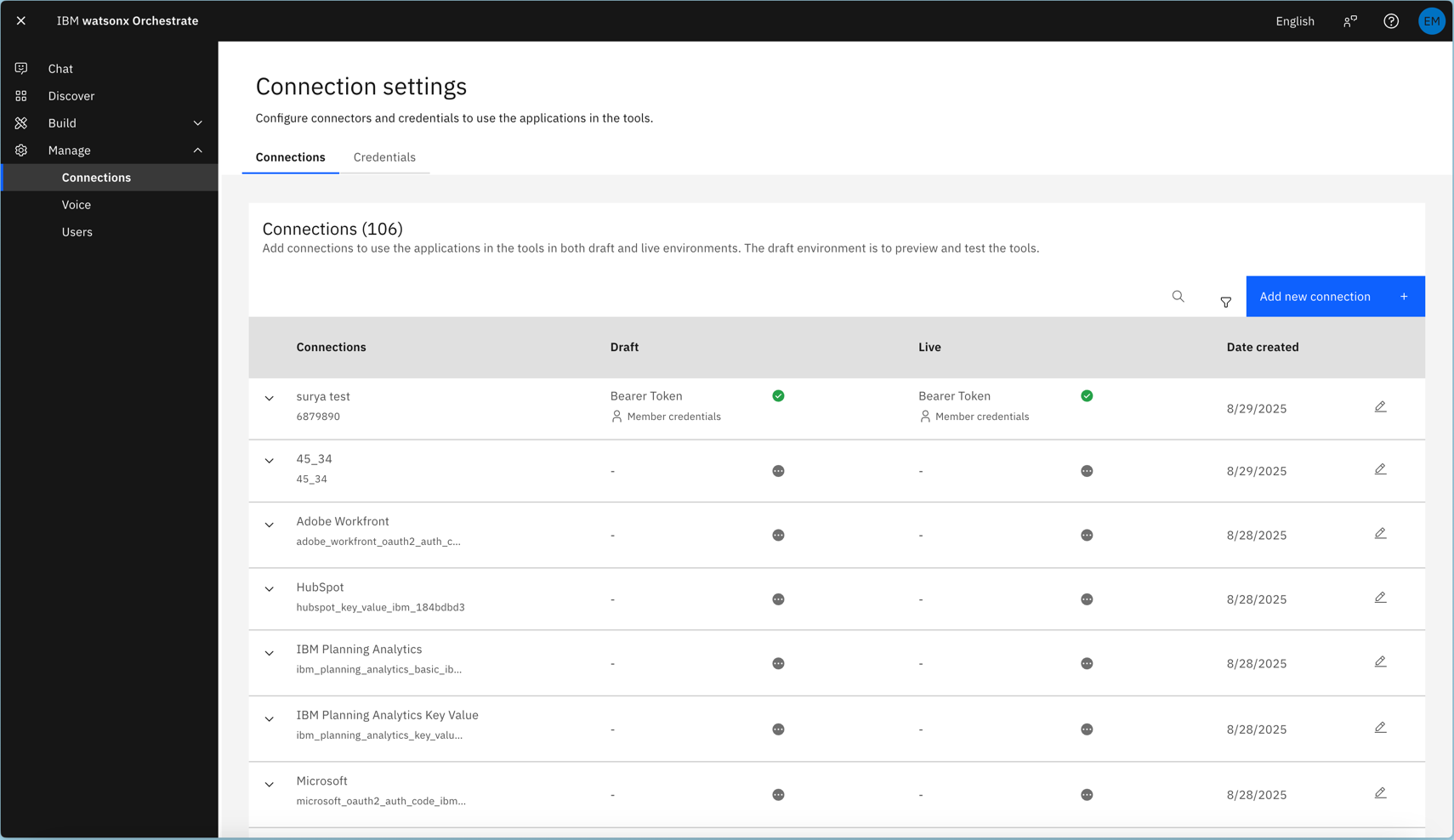
Once you've added a connection, you can manage its credentials through the Connections Management UI, located under **Manage** → **Connections**.
For member connections, each end user sets their own credentials through this interface.
 **Note**:
In the watsonx Orchestrate Developer Edition, you can only set credentials using the CLI. The UI does not support credential management in this edition.
As a result, you can only fully configure OAuth connections in the SaaS or on-premises offerings, where both CLI and UI credential setup are supported.
### Setting credentials via the CLI
Alternatively, you can set connection credentials via the CLI to more easily script agent setup.
#### Basic Connections
```bash BASH theme={null}
orchestrate connections set-credentials -a application_id \
--env draft \
-u username \
-p password
```
You can choose to set credentials for either the draft environment (used in the Manage Agents preview) or the live environment, depending on where the agent will operate.
The username of the user.
The password of the user.
#### Bearer Connections
```bash BASH theme={null}
orchestrate connections set-credentials -a application_id \
--env draft \
--token thebearertoken
```
You can choose to set credentials for either the draft environment (used in the Manage Agents preview) or the live environment, depending on where the agent will operate.
The Bearer token to send.
#### API Key Connections
```bash BASH theme={null}
orchestrate connections set-credentials -a application_id \
--env draft \
--api-key theapikey
```
You can choose to set credentials for either the draft environment (used in the Manage Agents preview) or the live environment, depending on where the agent will operate.
The API key to send.
#### Key Value Connections
```bash BASH theme={null}
orchestrate connections set-credentials -a application_id \
--env draft \
-e 'key1=value1' \
-e 'key2=value2'
```
You can choose to set credentials for either the draft environment (used in the Manage Agents preview) or the live environment, depending on where the agent will operate.
A key-value pair can be used to securely pass configuration data to downstream tools or AI gateway providers. Entries are provided in the form `key=value`.
#### OAuth
OAuth supports multiple authentication flows, as outlined in the [OpenAPI specification](https://swagger.io/docs/specification/v3_0/authentication/oauth2/). watsonx Orchestrate can use these flows to generate authentication tokens for compatible downstream consumers.
Unlike other authentication methods, such as Basic Auth or API Key, where tools receive the same credentials that were configured,
**OAuth connections dynamically resolve an `access_token` within Orchestrate**.
The platform generates this token on behalf of the tool and securely provides it during execution.
**Auth Code Flow**
**Note**:
In the watsonx Orchestrate Developer Edition, you can only set credentials using the CLI. The UI does not support credential management in this edition.
As a result, you can only fully configure OAuth connections in the SaaS or on-premises offerings, where both CLI and UI credential setup are supported.
### Setting credentials via the CLI
Alternatively, you can set connection credentials via the CLI to more easily script agent setup.
#### Basic Connections
```bash BASH theme={null}
orchestrate connections set-credentials -a application_id \
--env draft \
-u username \
-p password
```
You can choose to set credentials for either the draft environment (used in the Manage Agents preview) or the live environment, depending on where the agent will operate.
The username of the user.
The password of the user.
#### Bearer Connections
```bash BASH theme={null}
orchestrate connections set-credentials -a application_id \
--env draft \
--token thebearertoken
```
You can choose to set credentials for either the draft environment (used in the Manage Agents preview) or the live environment, depending on where the agent will operate.
The Bearer token to send.
#### API Key Connections
```bash BASH theme={null}
orchestrate connections set-credentials -a application_id \
--env draft \
--api-key theapikey
```
You can choose to set credentials for either the draft environment (used in the Manage Agents preview) or the live environment, depending on where the agent will operate.
The API key to send.
#### Key Value Connections
```bash BASH theme={null}
orchestrate connections set-credentials -a application_id \
--env draft \
-e 'key1=value1' \
-e 'key2=value2'
```
You can choose to set credentials for either the draft environment (used in the Manage Agents preview) or the live environment, depending on where the agent will operate.
A key-value pair can be used to securely pass configuration data to downstream tools or AI gateway providers. Entries are provided in the form `key=value`.
#### OAuth
OAuth supports multiple authentication flows, as outlined in the [OpenAPI specification](https://swagger.io/docs/specification/v3_0/authentication/oauth2/). watsonx Orchestrate can use these flows to generate authentication tokens for compatible downstream consumers.
Unlike other authentication methods, such as Basic Auth or API Key, where tools receive the same credentials that were configured,
**OAuth connections dynamically resolve an `access_token` within Orchestrate**.
The platform generates this token on behalf of the tool and securely provides it during execution.
**Auth Code Flow**
```bash BASH theme={null}
orchestrate connections set-credentials -a application_id \
--env draft \
--client-id 'clientid' \
--client-secret 'clientsecret' \
--authorization-url 'https://api.example.com/oauth2/authorize' \
--token-url 'https://api.example.com/oauth2/token' \
--scope admin
```
You can choose to set credentials for either the draft environment (used in the Manage Agents preview) or the live environment, depending on where the agent will operate
The OAuth connection's client ID. This value uniquely identifies the application (watsonx Orchestrate) to the OAuth provider.
The OAuth connection's client secret. This value authenticates the application (watsonx Orchestrate) with the OAuth provider.
Specifies how to send the OAuth credentials. Supported values: `header`, `body`.
The URL where watsonx Orchestrate exchanges the user authorization, client ID, and client secret to obtain an access token.
A comma-separated list of OAuth scopes to request. These scopes define the permissions granted to the generated token for accessing the upstream service provider.
Define custom field options for an OAuth request.
Use key-value pairs in the format location:\=\ or \=\.
You can pass multiple values like this: -t key1=value1 -t location:key2=value2.
Valid locations are: `header`, `body`, and `query`. If you omit the location, it defaults to `header`.
Define custom field options for an oauth\_auth\_code\_flow auth server request.
Use key-value pairs in the format location:\=\ or \=\.
You can pass multiple values like this: --auth-entries key1=value1 --auth-entries location:key2=value2.
The only valid location is `query`, which also serves as the default if you omit it.
**🚧 Implicit flow**
Currently, watsonx Orchestrate does not support OAuth implicit flows.
*Support for this feature is coming soon*.
**Password flow**
```bash BASH theme={null}
orchestrate connections set-credentials -a application_id \
--env draft \
--client-id 'clientid' \
--client-secret 'clientsecret' \
--username 'username' \
--password 'password' \
--token-url 'https://api.example.com/oauth2/token' \
--scope admin
```
You can choose to set credentials for either the draft environment (used in the Manage Agents preview) or the live environment, depending on where the agent will operate
The clientId of the OAuth connection. This is used to uniquely identify the application (watsonx Orchestrate) to the oauth provider.
The clientSecret of the Oauth connection. This is used to authentication the application (watsonx Orchestate) to the oauth provider.
This is the url watsonx Orchestrate will exchange the user authorization, client id and secret to to fetch an access token.
A comma separated list of oauth scopes to request for the user to grant the generated token certain privileged accesses to the upstream service provider.
**Client Credentials flow**
```bash BASH theme={null}
orchestrate connections set-credentials -a application_id \
--env draft \
--client-id 'clientid' \
--client-secret 'clientsecret' \
--token-url 'https://api.example.com/oauth2/token' \
--scope admin
```
You can choose to set credentials for either the draft environment (used in the Manage Agents preview) or the live environment, depending on where the agent will operate
The clientId of the OAuth connection. This is used to uniquely identify the application (watsonx Orchestrate) to the oauth provider.
The clientSecret of the Oauth connection. This is used to authentication the application (watsonx Orchestate) to the oauth provider.
A comma separated list of oauth scopes to request for the user to grant the generated token certain privileged accesses to the upstream service provider.
This is the url watsonx Orchestrate will exchange the user authorization, client id and secret to to fetch an access token.
A comma separated list of oauth scopes to request for the user to grant the generated token certain privileged accesses to the upstream service provider.
#### 🌐 SSO / IDP auth (on behalf of single exchange)
Single exchange uses the OAuth Token Exchange grant to perform a one-time delegated exchange on behalf of the user. It's ideal for lightweight actions that need temporary, delegated access without establishing a persistent session.
```bash BASH theme={null}
orchestrate connections set-credentials \
-a my_app \
--env draft \
--grant-type "urn:ietf:params:oauth:grant-type:token-exchange" \
--client-id "" \
--token-url ""
```
Choose the environment where the agent operates: **draft** (Manage Agents preview) or **live**.
The OAuth connection's **client ID**. Uniquely identifies watsonx Orchestrate to the OAuth provider.
The OAuth token endpoint where watsonx Orchestrate performs the token exchange.
For single exchange, use `urn:ietf:params:oauth:grant-type:token-exchange`.
Define custom field options for an OAuth request.
Use key-value pairs in the format `location:<key>=<value>` or `<key>=<value>`.
You can pass multiple values like this: `-t key1=value1 -t location:key2=value2`.
Valid locations are: `header`, `body`, and `query`. If you omit the location, it defaults to `header`.
#### 🌐 SSO / IDP auth (on behalf of flow)
```bash BASH theme={null}
orchestrate connections set-identity-provider --app-id workday \
--env draft \
--url https://idp-server/oauth2/v2.0/token \
--client-id clientid \
--client-secret clientsecret \
--scope scope \
--grant-type urn:ietf:params:oauth:grant-type:jwt-bearer
```
You can choose to set credentials for either the draft environment (used in the Manage Agents preview) or the live environment, depending on where the agent will operate
You can choose to set credentials for either the draft environment (used in the Manage Agents preview) or the live environment, depending on where the agent will operate
The OAuth connection's **client ID**. This value uniquely identifies the application (watsonx Orchestrate) to the OAuth provider.
The clientSecret of the Oauth connection. This is used to authentication the application (watsonx Orchestate) to the oauth provider.
The URL where watsonx Orchestrate exchanges the user authorization, client ID, and client secret to obtain an access token.
A comma separated list of oauth scopes to request for the user to grant the generated token certain privileged accesses to the upstream service provider.
Define custom field options for an OAuth request.
Use key-value pairs in the format `location:<key>=<value>` or `<key>=<value>`.
You can pass multiple values like this: `-t key1=value1 -t location:key2=value2`.
Valid locations are: `header`, `body`, and `query`. If you omit the location, it defaults to `header`.
```bash BASH theme={null}
orchestrate connections set-credentials --app-id workday \
--env draft \
--client-id clientid \
--token-url https://token-server/ccx/oauth2/ibmsrv_dpt1/token \
--grant-type urn:ietf:params:oauth:grant-type:saml2-bearer
```
You can choose to set credentials for either the draft environment (used in the Manage Agents preview) or the live environment, depending on where the agent will operate
The OAuth connection's **client ID**. This value uniquely identifies the application (watsonx Orchestrate) to the OAuth provider.
The URL where watsonx Orchestrate exchanges the user authorization, client ID, and client secret to obtain an access token.
The grant type of the identity provider's auth service.
Define custom field options for an OAuth request.
Use key-value pairs in the format `location:<key>=<value>` or `<key>=<value>`.
You can pass multiple values like this: `-t key1=value1 -t location:key2=value2`.
Valid locations are: `header`, `body`, and `query`. If you omit the location, it defaults to `header`.