> ## Documentation Index
> Fetch the complete documentation index at: https://developer.watson-orchestrate.ibm.com/llms.txt
> Use this file to discover all available pages before exploring further.
# Connect to external agents
## External Agents
External agents are built outside watsonx Orchestrate and can be used as collaborators for native agents.
watsonx Orchestrate supports multiple provider protocols, including [external\_chat](#external-chat-chat-completions-api), the [Agent-to-Agent Protocol (A2A)](#agent-to-agent-a2a-protocol), and specialized communication protocols for integrating with [watsonx AI Agent Builder](#watsonx-ai-agent-builder) agents, [watsonx Assistants](#external-watsonx-assistants), and [Salesforce Agent Force](#salesforce-agentforce) agents.
`external_chat` and `A2A` agents can be built on any underlying agent platform such as BeeAI, Langgraph, and CrewAI, where the user hosts the agent themselves, on Code Engine.
### Providers
#### External Chat (Chat Completions API)
The `external_chat` provider can be used to integrate with any agent that is capable of providing an OpenAI style chat completions endpoint and is the most common form of integration.
The documentation for this API spec can be found on the [watsonx-orchestrate-developer-toolkit](https://github.com/watson-developer-cloud/watsonx-orchestrate-developer-toolkit/tree/main/external_agent).
A reference Langgraph external agent can be found [here](https://github.com/watson-developer-cloud/watsonx-orchestrate-developer-toolkit/tree/main/external_agent/examples/langgraph_python).
```yaml YAML [expandable] theme={null}
spec_version: v1
kind: external
name: news_agent
title: News Agent
nickname: news_agent
provider: external_chat
description: |
An agent built in langchain which searches the news.
tags:
- test
api_url: "https://someurl.com" # the url of the external agent
auth_scheme: BEARER_TOKEN # one of BEARER_TOKEN | API_KEY | NONE
auth_config:
token: "123" # this is token for both BEARER_TOKEN and API_KEY
chat_params: # chat_parms are parameters sent to an agent on each request
stream: true # should the external agent be invoked using using SSE streaming or as a rest call
config: # config represents the internal configuration of this agent used by wxo
hidden: false # Hide this collaborator agent from the ui
enable_cot: true # Does the external agent return all internal steps and tool calls
```
```json JSON [expandable] theme={null}
{
"spec_version": "v1",
"kind": "external",
"name": "news_agent",
"title": "News Agent",
"nickname": "news_agent",
"provider": "external_chat",
"description": "An agent built in langchain which searches the news.\n",
"tags": [
"test"
],
"api_url": "https://someurl.com",
"auth_scheme": "BEARER_TOKEN",
"auth_config": {
"token": "123"
},
"chat_params": {
"stream": true
},
"config": {
"hidden": false,
"enable_cot": true
}
}
```
```python Python [expandable] theme={null}
from ibm_watsonx_orchestrate.agent_builder.agents import Agent, ExternalAgent, AgentKind, AgentProvider, ExternalAgentAuthScheme
my_agent = ExternalAgent(
kind=AgentKind.EXTERNAL,
name="news_agent",
title="News Agent",
nickname="news_agent",
provider=AgentProvider.EXT_CHAT,
description="An agent built in langchain which searches the news.\n",
tags=['test'],
api_url="https://someurl.com",
auth_scheme=ExternalAgentAuthScheme.BEARER_TOKEN,
auth_config={
"token": "123"
},
chat_params={
"stream": True
},
config={
"hidden": False,
"enable_cot": True
}
)
# External Agents can only be used as a collaborator of a native agent as shown below
native_agent = Agent(
# omitted for brevity
collaborators=[my_agent]
)
```
#### Agent to Agent (A2A) Protocol
The [Agent to Agent Protocol (A2A)](https://github.com/a2aproject/A2A) is an open standard designed to enable communication and interoperability between multiple agentic systems. Because the standard evolves rapidly, watsonx Orchestrate specifies the A2A version in the provider field to ensure compatibility when communicating with agents.
The currently supported version is 0.3.0. Earlier versions, such as 0.2.1, are deprecated and will be removed in a future release. To ensure continued support, use version 0.3.0 or later when registering A2A-compatible agents.
For a sample LangGraph agent compatible with the A2A protocol, see the [a2a-samples repository](https://github.com/a2aproject/a2a-samples/tree/main/samples/python/agents/langgraph).
To register an agent that is compatible with the A2A protocol, set `provider` to `external_chat/A2A/0.3.0`, like the following example:
```yaml YAML [expandable] theme={null}
spec_version: v1
kind: external
name: news_agent
title: News Agent
nickname: news_agent
provider: external_chat/A2A/0.3.0 # this is the identifier for A2A agents, provider/protocol/version of A2A supported
description: |
An agent built in langchain which searches the news.
tags:
- test
api_url: "https://someurl.com" # the url of the external agent
auth_scheme: BEARER_TOKEN # one of BEARER_TOKEN | API_KEY | NONE
auth_config:
token: "123" # this is token for both BEARER_TOKEN and API_KEY
chat_params: # chat_parms are parameters sent to an agent on each request
sendHistory: # indicates whether conversation history should be sent to the external A2A agent
stream: false # should the external agent be invoked using using SSE streaming or as a rest call
pushNotifications: true # set to true if the external agent can send push notifications to provide updates on async tasks
config: # config represents the internal configuration of this agent used by wxo
hidden: false # Hide this collaborator agent from the ui
```
```json JSON [expandable] theme={null}
{
"spec_version": "v1",
"kind": "external",
"name": "news_agent",
"title": "News Agent",
"nickname": "news_agent",
"provider": "external_chat/A2A/0.2.0",
"description": "An agent built in langchain which searches the news.",
"tags": ["test"],
"api_url": "https://someurl.com",
"auth_scheme": "BEARER_TOKEN",
"auth_config": {
"token": "123"
},
"chat_params": {
"stream": true,
"pushNotifications": true
},
"config": {
"hidden": false
}
}
```
**Asynchronous updates with push notifications (technical preview)**
For tasks that run for extended periods (e.g., minutes, hours, or days) or in scenarios where clients cannot maintain persistent connections—such as mobile applications or serverless functions — A2A supports asynchronous updates via push notifications. This mechanism enables the A2A Server to actively notify a client-provided webhook whenever a significant task update occurs.
If your agent supports asynchronous push notifications for long-running tasks, register this capability by setting the property:
```yaml YAML theme={null}
pushNotifications: true
```
The push notification configuration is provided to the external A2A agent in the initial message/send or message/stream request. The A2A agent must include the complete update — such as message, task, and artifact details (as applicable) — in the notification payload, along with the `corr_id` value received in the metadata of the initial request.
Push notifications use Bearer token authentication, where the token is generated from API keys as described in the [Getting Started](https://developer.ibm.com/apis/catalog/watsonorchestrate--custom-assistants/Getting+Started) guide.
**Callback URL and authentication**
The callback URL is included in the request sent to the A2A agent. To send push notifications, you must:
* Use a valid [API key](https://developer.ibm.com/apis/catalog/watsonorchestrate--custom-assistants/Getting+Started) to generate a Bearer token for authentication.
* Provide complete task update details in the notification payload, following the [A2A protocol’s task object specification](https://a2a-protocol.org/latest/specification/#61-task-object). Partial status updates are not sufficient.
WXO supports the A2A protocol only over `JSON-RPC 2.0` on HTTP. Although A2A can use multiple transport protocols, this implementation is limited to `JSON-RPC 2.0`.
#### Import external agents from a URL
Use the discovery command to retrieve and import an external agent by using a URL that hosts an agent card. This approach removes the need to manually define the full agent configuration when the external agent already exposes its metadata.
External agents that follow the A2A protocol typically publish an agent card at a well-known endpoint. The default location is `.well-known/agent-card.json`. The discovery command uses this endpoint unless a custom endpoint is provided.
After the agent is discovered, the configuration is retrieved and the agent can be exported and saved locally. The exported agent can then be imported and used like other external agents.
##### Discover an agent by using the default endpoint
```bash BASH theme={null}
orchestrate agents discover -u https://example.com
```
##### Discover an agent by using a custom endpoint
Use a custom endpoint when the agent card is not located at the default path.
```bash BASH theme={null}
orchestrate agents discover -u https://example.com -e .well-known/agent-card-2.json
```
##### Discover an agent by using a connection for authentication
Some external agents require authentication. Provide a connection to retrieve the agent configuration.
```bash BASH theme={null}
orchestrate agents discover -u https://example.com -a my-a2a-connection
```
##### Discover an agent by using a custom name
Override the agent name defined in the agent card.
```bash BASH theme={null}
orchestrate agents discover -u https://example.com -n my_custom_agent -a my-a2a-connection
```
#### Command behavior
* Retrieves agent configuration from a URL that hosts an agent card.
* Uses .well-known/agent-card.json as the default endpoint.
* Supports custom endpoints for environments that expose multiple agents or non-standard paths.
* Supports authenticated access through a configured connection.
* Allows overriding the agent name during discovery.
* Enables exporting the discovered agent for local use and later import into an environment.
#### watsonx AI Agent Builder
You can also integrate with agents built using watsonx.ai's [agent builder platform](https://www.ibm.com/products/watsonx-ai/ai-agent-development).
For more information, see [Registering agents from watsonx.ai](https://www.ibm.com/docs/en/watsonx/watson-orchestrate/current?topic=agent-managing-agents-in-ai-chat#registering-agents-from-watsonxai).
Instead of using the API, complete the following YAML file and import your agent.
Provide well-crafted descriptions for your agents. These descriptions are used by supervisor agents to determine how to route user requests. For more information, see [Writing descriptions for agents](../agents/descriptions#writing-descriptions-for-agents).
```yaml YAML [expandable] theme={null}
spec_version: v1
kind: external
name: news_agent
title: News Agent
provider: wx.ai # the provider will always be wx.ai
description: |
An agent built in langchain which searches the news.
tags:
- test
api_url: "https://us-south.ml.cloud.ibm.com/ml/v4/deployments//ai_service_stream?version=2021-05-01"
auth_scheme: API_KEY # this will always be API_KEY
auth_config:
token: "" # this is the API key for wx.ai
chat_params:
stream: true # should the external agent be invoked using using SSE streaming or as a rest call
config:
hidden: false # Hide this collaborator agent from the ui
enable_cot: true # Does the external agent return all internal steps and tool calls
```
```json JSON [expandable] theme={null}
{
"spec_version": "v1",
"kind": "external",
"name": "news_agent",
"title": "News Agent",
"provider": "wx.ai",
"description": "An agent built in langchain which searches the news.\n",
"tags": [
"test"
],
"api_url": "https://us-south.ml.cloud.ibm.com/ml/v4/deployments//ai_service_stream?version=2021-05-01",
"auth_scheme": "API_KEY",
"auth_config": {
"token": "my-api-key"
},
"chat_params": {
"stream": true
},
"config": {
"hidden": false,
"enable_cot": true
}
}
```
```python Python [expandable] theme={null}
from ibm_watsonx_orchestrate.agent_builder.agents import Agent, ExternalAgent, AgentKind, AgentProvider, ExternalAgentAuthScheme
my_agent = ExternalAgent(
kind=AgentKind.EXTERNAL,
name="news_agent",
title="News Agent",
nickname="news_agent",
provider=AgentProvider.WATSONX, # the provider will always be AgentProvider.WATSONX
description="An agent built in langchain which searches the news.\n",
tags=['test'],
api_url="https://us-south.ml.cloud.ibm.com/ml/v4/deployments//ai_service_stream?version=2021-05-01",
auth_scheme=ExternalAgentAuthScheme.API_KEY, # the auth_schema will always be ExternalAgentAuthScheme.API_KEY
auth_config={
"token": "my-api-key"
},
chat_params={
"stream": True # should the external agent be invoked using using SSE streaming or as a rest call
},
config={
"hidden": False,
"enable_cot": True
}
)
# External Agents can only be used as a collaborator of a native agent as shown below
native_agent = Agent(
# omitted for brevity
collaborators=[my_agent]
)
```
#### Salesforce AgentForce
To register an agent that is built within Salesforce Agent Force as an external agent:
1. Follow the **Getting Started Guide** for the Agent API. For more information, see the [Getting Started Guide](https://developer.salesforce.com/docs/einstein/genai/guide/agent-api-get-started.html).
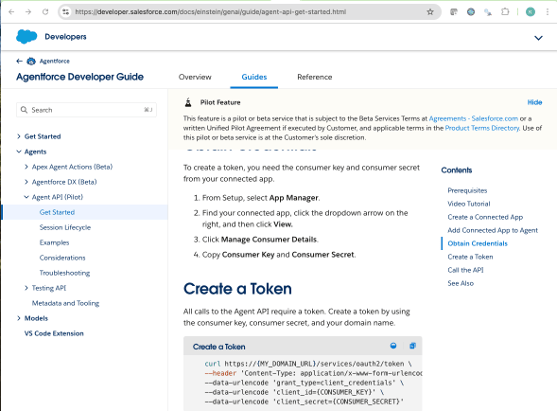 1. On the **Create a token** page, the following information applies to all Salesforce agents within the instance:
* **`api_url`**: Always set to `https://api.salesforce.com/einstein/ai-agent/v1`.
* **`auth_config.token`**: Use the `CONSUMER_SECRET` provided in the guide.
* **`chat_params`**:
* **`client_id`**: Use the `CONSUMER_KEY`.
* **`domain_url`**: Use the `DOMAIN_URL`.
* Optionally, specify a list of display types to pass to Orchestrate as a comma-separated string.
2. Provide well-crafted descriptions for your agents. These descriptions are used by supervisor agents to determine how to route user requests. For more information, see [Writing descriptions for agents](../agents/descriptions#writing-descriptions-for-agents).
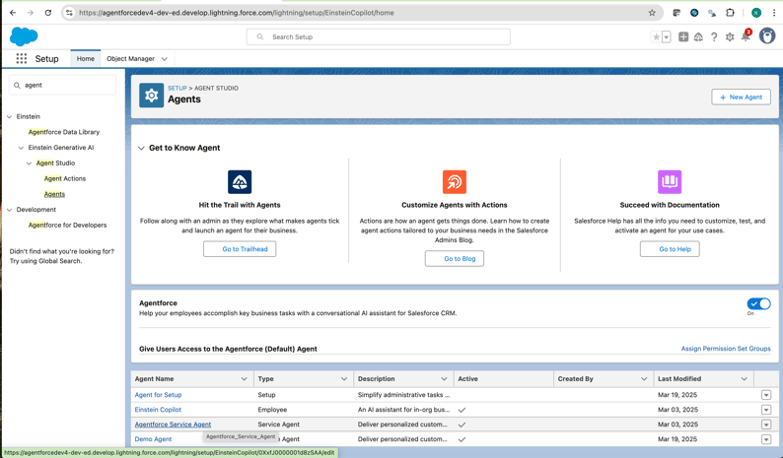
3. Lastly, under `chat_params` you need to specify your `agent_id`. This can be found by hovering over one of your agents and either right-clicking and copying the URL, or by manually writing it based on hover text. In the following example, the agent\_id is `0XxfJ0000001d8zSAA`.
1. On the **Create a token** page, the following information applies to all Salesforce agents within the instance:
* **`api_url`**: Always set to `https://api.salesforce.com/einstein/ai-agent/v1`.
* **`auth_config.token`**: Use the `CONSUMER_SECRET` provided in the guide.
* **`chat_params`**:
* **`client_id`**: Use the `CONSUMER_KEY`.
* **`domain_url`**: Use the `DOMAIN_URL`.
* Optionally, specify a list of display types to pass to Orchestrate as a comma-separated string.
2. Provide well-crafted descriptions for your agents. These descriptions are used by supervisor agents to determine how to route user requests. For more information, see [Writing descriptions for agents](../agents/descriptions#writing-descriptions-for-agents).
3. Lastly, under `chat_params` you need to specify your `agent_id`. This can be found by hovering over one of your agents and either right-clicking and copying the URL, or by manually writing it based on hover text. In the following example, the agent\_id is `0XxfJ0000001d8zSAA`.
 ```yaml YAML [expandable] theme={null}
name: salesforce_ext_agent
kind: external
provider: salesforce # the provider will always be salesforce
title: Customer Service Agent by Salesforce
tags:
- "salesforce"
description: An AI customer service agent whose job is to help customers with support questions or other issues.
api_url: "https://api.salesforce.com/einstein/ai-agent/v1"
auth_scheme: API_KEY
auth_config:
token: "my-api-key"
chat_params:
agent_id: "my-agent-id"
client_id: "my-client-id"
domain_url: "https://agentforceXXX-dev-ed.develop.my.salesforce.com"
# display_types: TextChunk,Confirm,Error,Failure,Inquire,Inform
config:
hidden: false
enable_cot: false
```
```json JSON [expandable] theme={null}
{
"name": "salesforce_ext_agent",
"kind": "external",
"provider": "salesforce",
"title": "Customer Service Agent by Salesforce",
"tags": [
"salesforce"
],
"description": "An AI customer service agent whose job is to help customers with support questions or other issues.",
"api_url": "https://api.salesforce.com/einstein/ai-agent/v1",
"auth_scheme": "API_KEY",
"auth_config": {
"token": "my-api-key"
},
"chat_params": {
"agent_id": "my-agent-id",
"client_id": "my-client-id",
"domain_url": "https://agentforceXXX-dev-ed.develop.my.salesforce.com"
},
"config": {
"hidden": false,
"enable_cot": false
}
}
```
```python Python [expandable] theme={null}
from ibm_watsonx_orchestrate.agent_builder.agents import Agent, ExternalAgent, AgentKind, AgentProvider, ExternalAgentAuthScheme
my_agent = ExternalAgent(
name="salesforce_ext_agent",
kind=AgentKind.EXTERNAL,
provider=AgentProvider.SALESFORCE, # the provider will always be AgentProvider.SALESFORCE
title="Customer Service Agent by Salesforce",
description="An AI customer service agent whose job is to help customers with support questions or other issues.",
tags=['salesforce'],
api_url="https://api.salesforce.com/einstein/ai-agent/v1",
auth_scheme=ExternalAgentAuthScheme.API_KEY, # the auth_schema will always be ExternalAgentAuthScheme.API_KEY
auth_config={
"token": "my-api-key"
},
chat_params={
"agent_id": "my-agent-id",
"client_id": "my-client-id",
"domain_url": "https://agentforceXXX-dev-ed.develop.my.salesforce.com"
},
config={
"hidden": False,
"enable_cot": True
}
)
# External Agents can only be used as a collaborator of a native agent as shown below
native_agent = Agent(
# omitted for brevity
collaborators=[my_agent]
)
```
### Microsoft Copilot Studio
You can integrate Microsoft Copilot Studio agents as external agents in watsonx Orchestrate using the Direct Line API. This integration allows you to leverage your existing Copilot Studio agents within the watsonx Orchestrate platform.
#### Prerequisites
Before you begin, ensure you have:
1. A Microsoft Copilot Studio agent configured and published
2. Access to the agent's Web channel security settings
3. The bot secret from your Copilot Studio agent
#### Configuration steps
1. In Microsoft Copilot Studio, navigate to your agent settings and select **No authentication** under agent settings.
```yaml YAML [expandable] theme={null}
name: salesforce_ext_agent
kind: external
provider: salesforce # the provider will always be salesforce
title: Customer Service Agent by Salesforce
tags:
- "salesforce"
description: An AI customer service agent whose job is to help customers with support questions or other issues.
api_url: "https://api.salesforce.com/einstein/ai-agent/v1"
auth_scheme: API_KEY
auth_config:
token: "my-api-key"
chat_params:
agent_id: "my-agent-id"
client_id: "my-client-id"
domain_url: "https://agentforceXXX-dev-ed.develop.my.salesforce.com"
# display_types: TextChunk,Confirm,Error,Failure,Inquire,Inform
config:
hidden: false
enable_cot: false
```
```json JSON [expandable] theme={null}
{
"name": "salesforce_ext_agent",
"kind": "external",
"provider": "salesforce",
"title": "Customer Service Agent by Salesforce",
"tags": [
"salesforce"
],
"description": "An AI customer service agent whose job is to help customers with support questions or other issues.",
"api_url": "https://api.salesforce.com/einstein/ai-agent/v1",
"auth_scheme": "API_KEY",
"auth_config": {
"token": "my-api-key"
},
"chat_params": {
"agent_id": "my-agent-id",
"client_id": "my-client-id",
"domain_url": "https://agentforceXXX-dev-ed.develop.my.salesforce.com"
},
"config": {
"hidden": false,
"enable_cot": false
}
}
```
```python Python [expandable] theme={null}
from ibm_watsonx_orchestrate.agent_builder.agents import Agent, ExternalAgent, AgentKind, AgentProvider, ExternalAgentAuthScheme
my_agent = ExternalAgent(
name="salesforce_ext_agent",
kind=AgentKind.EXTERNAL,
provider=AgentProvider.SALESFORCE, # the provider will always be AgentProvider.SALESFORCE
title="Customer Service Agent by Salesforce",
description="An AI customer service agent whose job is to help customers with support questions or other issues.",
tags=['salesforce'],
api_url="https://api.salesforce.com/einstein/ai-agent/v1",
auth_scheme=ExternalAgentAuthScheme.API_KEY, # the auth_schema will always be ExternalAgentAuthScheme.API_KEY
auth_config={
"token": "my-api-key"
},
chat_params={
"agent_id": "my-agent-id",
"client_id": "my-client-id",
"domain_url": "https://agentforceXXX-dev-ed.develop.my.salesforce.com"
},
config={
"hidden": False,
"enable_cot": True
}
)
# External Agents can only be used as a collaborator of a native agent as shown below
native_agent = Agent(
# omitted for brevity
collaborators=[my_agent]
)
```
### Microsoft Copilot Studio
You can integrate Microsoft Copilot Studio agents as external agents in watsonx Orchestrate using the Direct Line API. This integration allows you to leverage your existing Copilot Studio agents within the watsonx Orchestrate platform.
#### Prerequisites
Before you begin, ensure you have:
1. A Microsoft Copilot Studio agent configured and published
2. Access to the agent's Web channel security settings
3. The bot secret from your Copilot Studio agent
#### Configuration steps
1. In Microsoft Copilot Studio, navigate to your agent settings and select **No authentication** under agent settings.
 2. Obtain your bot secret from **Security → Web channel security** in the Copilot Studio interface.
 3. Configure your external agent YAML file with the following parameters:
* **`provider`**: Always set to `microsoft_copilot_studio`.
* **`api_url`**: The Direct Line API endpoint. For most users, this is `https://directline.botframework.com/v3/directline`. This may vary slightly based on your region.
* **`auth_scheme`**: Set to `NONE` since authentication is handled through the bot secret.
* **`auth_config.bot_secret`**: The bot secret obtained from Web channel security settings.
* **`chat_params.token_endpoint`**: The token generation endpoint. For most users, this is `https://directline.botframework.com/v3/directline/tokens/generate`. This may vary slightly based on your region.
4. Provide well-crafted descriptions for your agents. These descriptions are used by supervisor agents to determine how to route user requests. For more information, see [Writing descriptions for agents](../agents/descriptions#writing-descriptions-for-agents).
```yaml YAML [expandable] theme={null}
spec_version: v1
kind: external
name: copilot_studio_agent
title: Copilot Studio Agent
provider: microsoft_copilot_studio
description: |
A Microsoft Copilot Studio agent exposed through Direct Line.
api_url: https://directline.botframework.com/v3/directline
auth_scheme: NONE
auth_config:
bot_secret:
chat_params:
token_endpoint: https://directline.botframework.com/v3/directline/tokens/generate
# timeout_seconds: 180
# poll_interval: 0.5
# stream_chunk_size: 40
can_collaborate: false
config:
hidden: false
enable_cot: false
```
```json JSON [expandable] theme={null}
{
"spec_version": "v1",
"kind": "external",
"name": "copilot_studio_agent",
"title": "Copilot Studio Agent",
"provider": "microsoft_copilot_studio",
"description": "A Microsoft Copilot Studio agent exposed through Direct Line.\n",
"api_url": "https://directline.botframework.com/v3/directline",
"auth_scheme": "NONE",
"auth_config": {
"bot_secret": ""
},
"chat_params": {
"token_endpoint": "https://directline.botframework.com/v3/directline/tokens/generate",
"can_collaborate": false
},
"config": {
"hidden": false,
"enable_cot": false
}
}
```
```python Python [expandable] theme={null}
from ibm_watsonx_orchestrate.agent_builder.agents import Agent, ExternalAgent, AgentKind, AgentProvider, ExternalAgentAuthScheme
my_agent = ExternalAgent(
name="copilot_studio_agent",
kind=AgentKind.EXTERNAL,
provider=AgentProvider.MICROSOFT_COPILOT_STUDIO,
title="Copilot Studio Agent",
description="A Microsoft Copilot Studio agent exposed through Direct Line.",
api_url="https://directline.botframework.com/v3/directline",
auth_scheme=ExternalAgentAuthScheme.NONE,
auth_config={
"bot_secret": ""
},
chat_params={
"token_endpoint": "https://directline.botframework.com/v3/directline/tokens/generate",
"can_collaborate": False
},
config={
"hidden": False,
"enable_cot": False
}
)
# External Agents can only be used as a collaborator of a native agent as shown below
native_agent = Agent(
# omitted for brevity
collaborators=[my_agent]
)
```
For more information about the Microsoft Direct Line API, see [Configure web channel security](https://learn.microsoft.com/en-us/microsoft-copilot-studio/configure-web-security).
#### LangGraph agent
You can import LangGraph agents directly into watsonx Orchestrate. During the upload process, Orchestrate applies the Agent to Agent protocol behind the scenes to make the agent compatible with the platform. You use the same streamlined experience that you use for Python agents or MCP agents. A2A‑enabled LangGraph agents support lifecycle tasks such as update, delete, and export.
For a detailed description of how to import LangGraph agents, see [Importing LangGraph agents](https://www.ibm.com/docs/en/watsonx/watson-orchestrate/base?topic=agents-importing-langgraph).
**Limitations:**
* Supported for Python implementations only.
* Agents that are run inside the watsonx Orchestrate environment with the required isolation.
* Supports only `messages` in the agent graph between turns, so complex custom state objects get lost between turns.
**Example:**
```python PYTHON [expandable] theme={null}
"""
Simple Agent: No LLM - Hello World
A simple agent that returns a static "Hello World" message without using any LLM.
"""
from typing import Annotated, List, TypedDict
from langchain_core.messages import AIMessage, BaseMessage
from langchain_core.runnables.config import RunnableConfig
from langgraph.graph import StateGraph, START, END
class AgentState(TypedDict):
"""Simple state with just messages."""
messages: Annotated[List[BaseMessage], "conversation history"]
def hello_world_node(state: AgentState) -> AgentState:
"""
Node that returns a static Hello World message.
No LLM involved - just returns a hardcoded response.
"""
# Get the last user message if available
user_message = ""
if state["messages"]:
user_message = state["messages"][-1].content
# Create a simple response
response = AIMessage(
content=f"Hello World! I received your message: '{user_message}'. "
f"I'm a simple test agent with no LLM - I just return this static message."
)
return {"messages": state["messages"] + [response]}
def create_agent(config: RunnableConfig) -> StateGraph:
"""
Factory function that creates and returns a LangGraph StateGraph.
This agent has no LLM and just returns a static message.
Args:
config: Runtime configuration (not used in this simple agent)
Returns:
StateGraph: The compiled agent graph
"""
# Build a simple linear graph: START -> hello_world -> END
workflow = StateGraph(AgentState)
workflow.add_node("hello_world", hello_world_node)
workflow.add_edge(START, "hello_world")
workflow.add_edge("hello_world", END)
return workflow
if __name__ == "__main__":
# Test the agent locally
from langchain_core.messages import HumanMessage
app = create_agent({}).compile()
# Test 1: Simple message
result = app.invoke({"messages": [HumanMessage(content="Hi there!")]})
print("Test 1 - Simple message:")
print(result["messages"][-1].content)
print()
# Test 2: Different message
result = app.invoke({"messages": [HumanMessage(content="What can you do?")]})
print("Test 2 - Different message:")
print(result["messages"][-1].content)
```
This capability is supported through the A2A protocol.
##### Configuring checkpointers
Checkpointers persist agent state so you can resume execution and maintain context.
Choose the checkpointer that fits your environment and persistence needs, then add its configuration to the checkpointer section of the agent YAML file.
Use in-memory storage to persist state during execution. State resets when the process restarts.
```yml YAML theme={null}
checkpointer:
type: memory
```
**Example:**
```yaml theme={null}
spec_version: v1
kind: agent
name: my-agent
title: My LangGraph Agent
description: Agent with PostgreSQL state persistence
framework: langgraph
deployment:
code_bundle:
entrypoint: "main:create_graph"
checkpointer:
type: memory
```
Use a local SQLite file to persist state. State resets when the agent pod restarts.
```yml YAML theme={null}
checkpointer:
type: sqlite
```
**Requirements:**
* Add `langgraph-checkpoint-sqlite` to the agent `requirements.txt` file.
**Example:**
```yaml theme={null}
spec_version: v1
kind: agent
name: my-agent
title: My LangGraph Agent
description: Agent with PostgreSQL state persistence
framework: langgraph
deployment:
code_bundle:
entrypoint: "main:create_graph"
checkpointer:
type: sqlite
```
Use PostgreSQL to persist state across restarts and deployments.
```yml YAML theme={null}
checkpointer:
type: postgres
connection_string_key: db_connection_string
```
**Requirements:**
* Add `langgraph-checkpoint-postgres` to the agent `requirements.txt` file.
* Add the PostgreSQL connection to the file.
**Example:**
```yaml theme={null}
spec_version: v1
kind: agent
name: my-agent
title: My LangGraph Agent
description: Agent with PostgreSQL state persistence
framework: langgraph
deployment:
code_bundle:
entrypoint: "main:create_graph"
checkpointer:
type: postgres
connection_string_key: db_connection_string
```
Exclude the `checkpointer` section to run the agent without state persistence.
**Notes:**
* The `connection_string_key` maps to a credential entry that stores the database connection string. Choose API key as the connection type and enter the connection string as the value.
* For SQLite and PostgreSQL, the system manages database connections and schema setup automatically.
* The memory checkpointer requires no credentials or additional configuration.
## External watsonx Assistants
To register assistants from watsonx Assistant, you must obtain the following information:
* `service_instance_url`
* `api_key`
* `assistant_id`
* `environment_id`
**Note:** The location of the `service_instance_url` and `api_key` varies depending on whether the assistant is imported to IBM Cloud or AWS.
To retrieve your assistant ID:
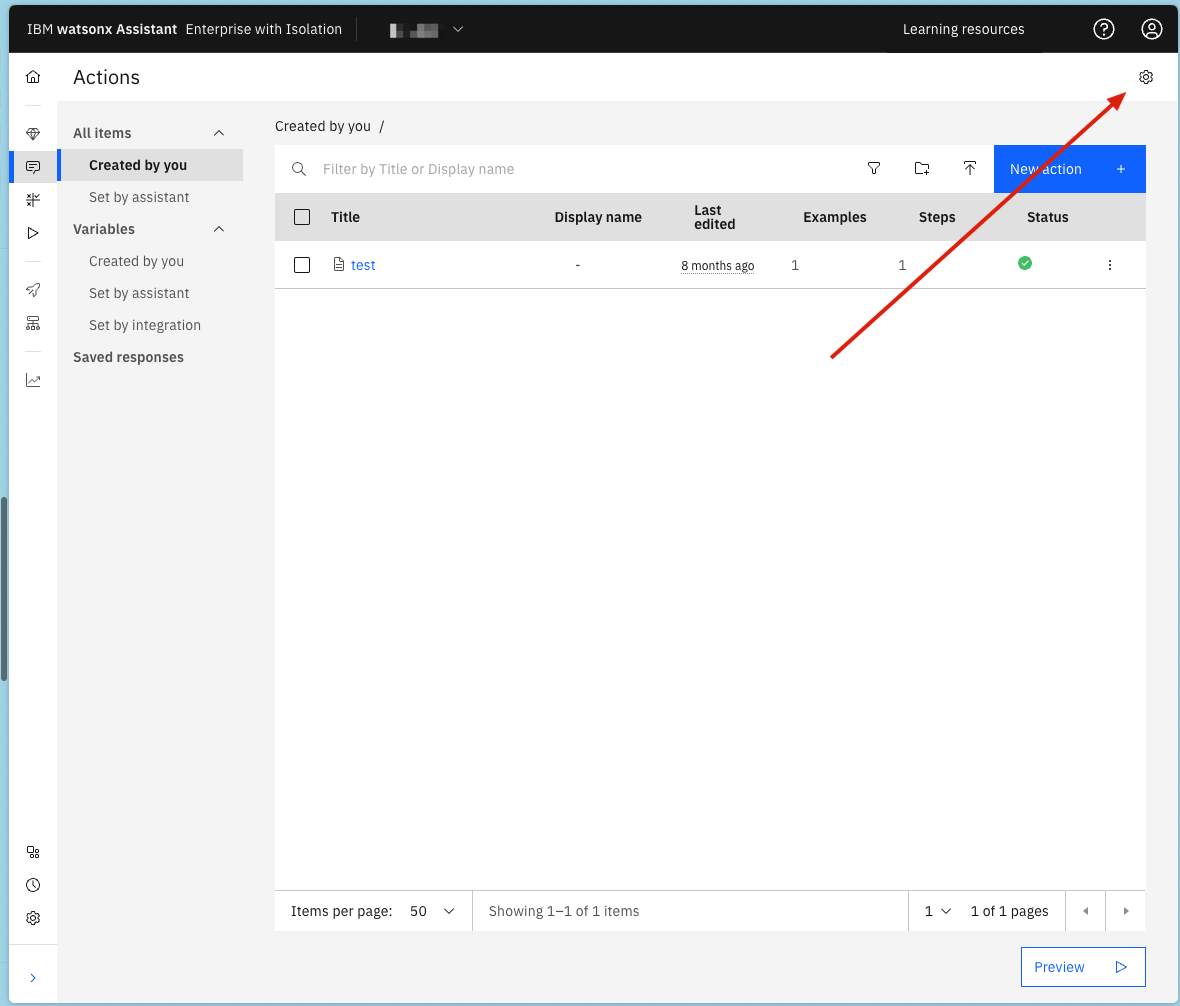
1. Navigate to the settings on the actions page and open the settings.
3. Configure your external agent YAML file with the following parameters:
* **`provider`**: Always set to `microsoft_copilot_studio`.
* **`api_url`**: The Direct Line API endpoint. For most users, this is `https://directline.botframework.com/v3/directline`. This may vary slightly based on your region.
* **`auth_scheme`**: Set to `NONE` since authentication is handled through the bot secret.
* **`auth_config.bot_secret`**: The bot secret obtained from Web channel security settings.
* **`chat_params.token_endpoint`**: The token generation endpoint. For most users, this is `https://directline.botframework.com/v3/directline/tokens/generate`. This may vary slightly based on your region.
4. Provide well-crafted descriptions for your agents. These descriptions are used by supervisor agents to determine how to route user requests. For more information, see [Writing descriptions for agents](../agents/descriptions#writing-descriptions-for-agents).
```yaml YAML [expandable] theme={null}
spec_version: v1
kind: external
name: copilot_studio_agent
title: Copilot Studio Agent
provider: microsoft_copilot_studio
description: |
A Microsoft Copilot Studio agent exposed through Direct Line.
api_url: https://directline.botframework.com/v3/directline
auth_scheme: NONE
auth_config:
bot_secret:
chat_params:
token_endpoint: https://directline.botframework.com/v3/directline/tokens/generate
# timeout_seconds: 180
# poll_interval: 0.5
# stream_chunk_size: 40
can_collaborate: false
config:
hidden: false
enable_cot: false
```
```json JSON [expandable] theme={null}
{
"spec_version": "v1",
"kind": "external",
"name": "copilot_studio_agent",
"title": "Copilot Studio Agent",
"provider": "microsoft_copilot_studio",
"description": "A Microsoft Copilot Studio agent exposed through Direct Line.\n",
"api_url": "https://directline.botframework.com/v3/directline",
"auth_scheme": "NONE",
"auth_config": {
"bot_secret": ""
},
"chat_params": {
"token_endpoint": "https://directline.botframework.com/v3/directline/tokens/generate",
"can_collaborate": false
},
"config": {
"hidden": false,
"enable_cot": false
}
}
```
```python Python [expandable] theme={null}
from ibm_watsonx_orchestrate.agent_builder.agents import Agent, ExternalAgent, AgentKind, AgentProvider, ExternalAgentAuthScheme
my_agent = ExternalAgent(
name="copilot_studio_agent",
kind=AgentKind.EXTERNAL,
provider=AgentProvider.MICROSOFT_COPILOT_STUDIO,
title="Copilot Studio Agent",
description="A Microsoft Copilot Studio agent exposed through Direct Line.",
api_url="https://directline.botframework.com/v3/directline",
auth_scheme=ExternalAgentAuthScheme.NONE,
auth_config={
"bot_secret": ""
},
chat_params={
"token_endpoint": "https://directline.botframework.com/v3/directline/tokens/generate",
"can_collaborate": False
},
config={
"hidden": False,
"enable_cot": False
}
)
# External Agents can only be used as a collaborator of a native agent as shown below
native_agent = Agent(
# omitted for brevity
collaborators=[my_agent]
)
```
For more information about the Microsoft Direct Line API, see [Configure web channel security](https://learn.microsoft.com/en-us/microsoft-copilot-studio/configure-web-security).
#### LangGraph agent
You can import LangGraph agents directly into watsonx Orchestrate. During the upload process, Orchestrate applies the Agent to Agent protocol behind the scenes to make the agent compatible with the platform. You use the same streamlined experience that you use for Python agents or MCP agents. A2A‑enabled LangGraph agents support lifecycle tasks such as update, delete, and export.
For a detailed description of how to import LangGraph agents, see [Importing LangGraph agents](https://www.ibm.com/docs/en/watsonx/watson-orchestrate/base?topic=agents-importing-langgraph).
**Limitations:**
* Supported for Python implementations only.
* Agents that are run inside the watsonx Orchestrate environment with the required isolation.
* Supports only `messages` in the agent graph between turns, so complex custom state objects get lost between turns.
**Example:**
```python PYTHON [expandable] theme={null}
"""
Simple Agent: No LLM - Hello World
A simple agent that returns a static "Hello World" message without using any LLM.
"""
from typing import Annotated, List, TypedDict
from langchain_core.messages import AIMessage, BaseMessage
from langchain_core.runnables.config import RunnableConfig
from langgraph.graph import StateGraph, START, END
class AgentState(TypedDict):
"""Simple state with just messages."""
messages: Annotated[List[BaseMessage], "conversation history"]
def hello_world_node(state: AgentState) -> AgentState:
"""
Node that returns a static Hello World message.
No LLM involved - just returns a hardcoded response.
"""
# Get the last user message if available
user_message = ""
if state["messages"]:
user_message = state["messages"][-1].content
# Create a simple response
response = AIMessage(
content=f"Hello World! I received your message: '{user_message}'. "
f"I'm a simple test agent with no LLM - I just return this static message."
)
return {"messages": state["messages"] + [response]}
def create_agent(config: RunnableConfig) -> StateGraph:
"""
Factory function that creates and returns a LangGraph StateGraph.
This agent has no LLM and just returns a static message.
Args:
config: Runtime configuration (not used in this simple agent)
Returns:
StateGraph: The compiled agent graph
"""
# Build a simple linear graph: START -> hello_world -> END
workflow = StateGraph(AgentState)
workflow.add_node("hello_world", hello_world_node)
workflow.add_edge(START, "hello_world")
workflow.add_edge("hello_world", END)
return workflow
if __name__ == "__main__":
# Test the agent locally
from langchain_core.messages import HumanMessage
app = create_agent({}).compile()
# Test 1: Simple message
result = app.invoke({"messages": [HumanMessage(content="Hi there!")]})
print("Test 1 - Simple message:")
print(result["messages"][-1].content)
print()
# Test 2: Different message
result = app.invoke({"messages": [HumanMessage(content="What can you do?")]})
print("Test 2 - Different message:")
print(result["messages"][-1].content)
```
This capability is supported through the A2A protocol.
##### Configuring checkpointers
Checkpointers persist agent state so you can resume execution and maintain context.
Choose the checkpointer that fits your environment and persistence needs, then add its configuration to the checkpointer section of the agent YAML file.
Use in-memory storage to persist state during execution. State resets when the process restarts.
```yml YAML theme={null}
checkpointer:
type: memory
```
**Example:**
```yaml theme={null}
spec_version: v1
kind: agent
name: my-agent
title: My LangGraph Agent
description: Agent with PostgreSQL state persistence
framework: langgraph
deployment:
code_bundle:
entrypoint: "main:create_graph"
checkpointer:
type: memory
```
Use a local SQLite file to persist state. State resets when the agent pod restarts.
```yml YAML theme={null}
checkpointer:
type: sqlite
```
**Requirements:**
* Add `langgraph-checkpoint-sqlite` to the agent `requirements.txt` file.
**Example:**
```yaml theme={null}
spec_version: v1
kind: agent
name: my-agent
title: My LangGraph Agent
description: Agent with PostgreSQL state persistence
framework: langgraph
deployment:
code_bundle:
entrypoint: "main:create_graph"
checkpointer:
type: sqlite
```
Use PostgreSQL to persist state across restarts and deployments.
```yml YAML theme={null}
checkpointer:
type: postgres
connection_string_key: db_connection_string
```
**Requirements:**
* Add `langgraph-checkpoint-postgres` to the agent `requirements.txt` file.
* Add the PostgreSQL connection to the file.
**Example:**
```yaml theme={null}
spec_version: v1
kind: agent
name: my-agent
title: My LangGraph Agent
description: Agent with PostgreSQL state persistence
framework: langgraph
deployment:
code_bundle:
entrypoint: "main:create_graph"
checkpointer:
type: postgres
connection_string_key: db_connection_string
```
Exclude the `checkpointer` section to run the agent without state persistence.
**Notes:**
* The `connection_string_key` maps to a credential entry that stores the database connection string. Choose API key as the connection type and enter the connection string as the value.
* For SQLite and PostgreSQL, the system manages database connections and schema setup automatically.
* The memory checkpointer requires no credentials or additional configuration.
## External watsonx Assistants
To register assistants from watsonx Assistant, you must obtain the following information:
* `service_instance_url`
* `api_key`
* `assistant_id`
* `environment_id`
**Note:** The location of the `service_instance_url` and `api_key` varies depending on whether the assistant is imported to IBM Cloud or AWS.
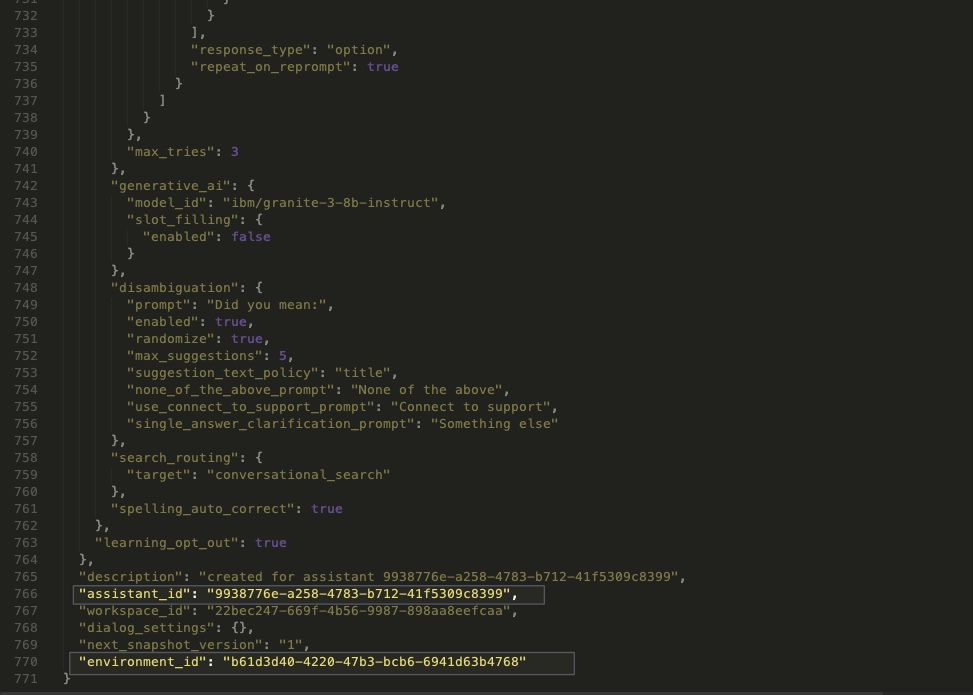
To retrieve your assistant ID:
1. Navigate to the settings on the actions page and open the settings.
 1. On the farthest right tab, select Upload/Download, and click the **Download** button.
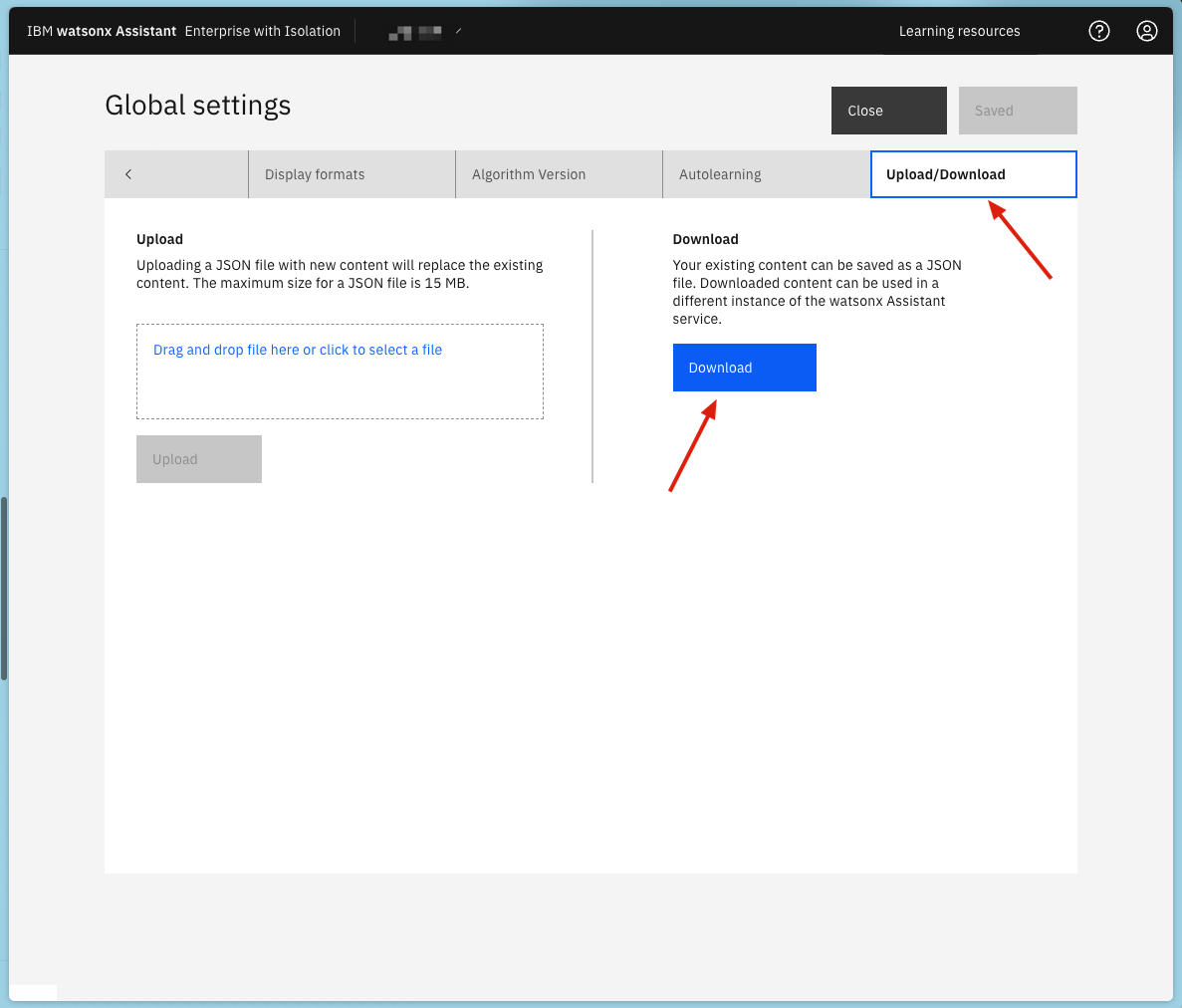 1. Locate your `environment_id` and `assistant_id` in the output JSON.
 #### IBM Cloud
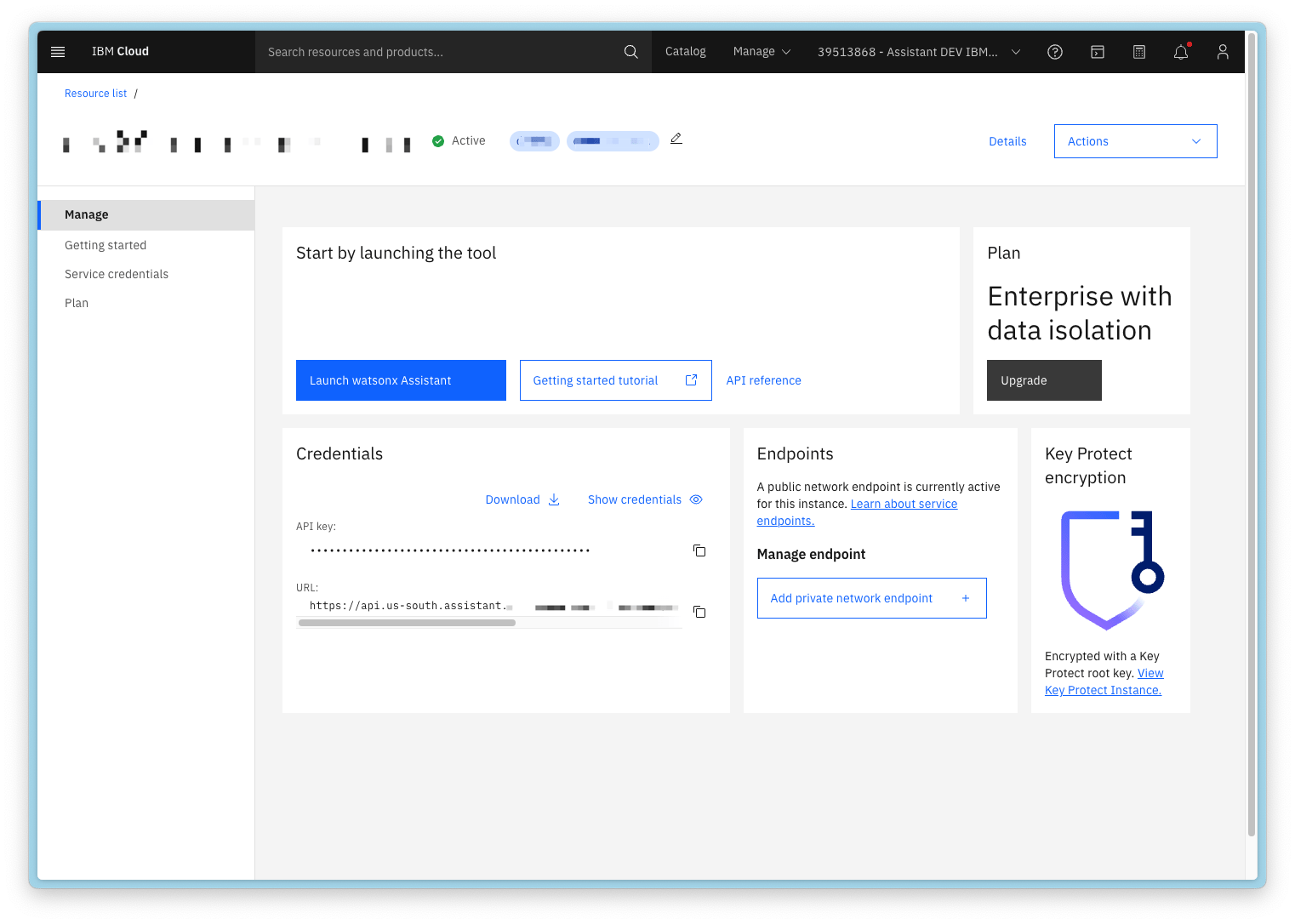
On IBM Cloud, your `service_instance_url` and `api_key` can be found on the page where you launch your assistant's tooling UI.
#### IBM Cloud
On IBM Cloud, your `service_instance_url` and `api_key` can be found on the page where you launch your assistant's tooling UI.
 Provide well-crafted descriptions for your agents. These descriptions are used by supervisor agents to determine how to route user requests. For more information, see [Writing descriptions for agents](../agents/descriptions#writing-descriptions-for-agents).
```yaml YAML [expandable] theme={null}
spec_version: v1
kind: assistant
name: hr_assistant
title: HR Agent
description: |
This assistant is capable of acting as a first point of contact for all support requests.
tags:
- wxa
config:
assistant_id: assistantid
environment_id: environmentid
hidden: false
api_key: my-api-key
service_instance_url: https://api.eu-de.assistant.watson.cloud.ibm.com/instances/
api_version: '2023-06-15T00:00:00.000Z'
auth_type: IBM_CLOUD_IAM
authorization_url: https://iam.cloud.ibm.com
```
```json JSON [expandable] theme={null}
{
"spec_version": "v1",
"kind": "assistant",
"name": "hr_assistant",
"title": "HR Agent",
"description": "This assistant is capable of acting as a first point of contact for all support requests.\n",
"tags": [
"wxa"
],
"config": {
"assistant_id": "assistantid",
"environment_id": "environmentid",
"hidden": false,
"api_key": "my-api-key",
"service_instance_url": "https://api.eu-de.assistant.watson.cloud.ibm.com/instances/",
"api_version": "2023-06-15T00:00:00.000Z",
"auth_type": "IBM_CLOUD_IAM",
"authorization_url": "https://iam.cloud.ibm.com"
}
}
```
```python Python [expandable] theme={null}
from ibm_watsonx_orchestrate.agent_builder.agents import Agent, AssistantAgent, AssistantAgentConfig, AgentKind
from ibm_watsonx_orchestrate.agent_builder.agents.types import AssistantAgentAuthType
my_agent = AssistantAgent(
name="hr_assistant",
kind=AgentKind.ASSISTANT,
title="HR Agent",
description="This assistant is capable of acting as a first point of contact for all support requests.\n",
tags=['wxa'],
config=AssistantAgentConfig(
assistant_id="assistantid",
environment_id="environmentid",
hidden=False,
api_key="my-api-key",
service_instance_url="https://api.eu-de.assistant.watson.cloud.ibm.com/instances/",
api_version="2023-06-15T00:00:00.000Z",
auth_type=AssistantAgentAuthType.IBM_CLOUD_IAM,
authorization_url="https://iam.cloud.ibm.com"
)
)
# External Agents can only be used as a collaborator of a native agent as shown below
native_agent = Agent(
# omitted for brevity
collaborators=[my_agent]
)
```
#### AWS
Provide well-crafted descriptions for your agents. These descriptions are used by supervisor agents to determine how to route user requests. For more information, see [Writing descriptions for agents](../agents/descriptions#writing-descriptions-for-agents).
```yaml YAML [expandable] theme={null}
spec_version: v1
name: my_assistant
title: my_assistant
description: |
This assistant is capable of handling call center operations.
kind: assistant
tags:
- wxa
config:
assistant_id: assistantid
environment_id: environmentid
hidden: false
api_key: my-api-key
service_instance_url: https://api.us-east-1.preprod.aws.watsonassistant.ibm.com/instances/
api_version: '2023-06-15'
auth_type: MCSP
authorization_url: https://iam.platform.saas.ibm.com
```
```json JSON [expandable] theme={null}
{
"spec_version": "v1",
"name": "my_assistant",
"title": "my_assistant",
"description": "This assistant is capable of handling call center operations.\n",
"kind": "assistant",
"tags": [
"wxa"
],
"config": {
"assistant_id": "assistantid",
"environment_id": "environmentid",
"hidden": false,
"api_key": "my-api-key",
"service_instance_url": "https://api.us-east-1.preprod.aws.watsonassistant.ibm.com/instances/",
"api_version": "2023-06-15",
"auth_type": "MCSP",
"authorization_url": "https://iam.platform.saas.ibm.com"
}
}
```
```python Python [expandable] theme={null}
from ibm_watsonx_orchestrate.agent_builder.agents import Agent, AssistantAgent, AssistantAgentConfig, AgentKind
from ibm_watsonx_orchestrate.agent_builder.agents.types import AssistantAgentAuthType
my_agent = AssistantAgent(
name="hr_assistant",
kind=AgentKind.ASSISTANT,
title="HR Agent",
description="This assistant is capable of acting as a first point of contact for all support requests.\n",
tags=['wxa'],
config=AssistantAgentConfig(
assistant_id="assistantid",
environment_id="environmentid",
hidden=False,
api_key="my-api-key",
service_instance_url="https://api.us-east-1.preprod.aws.watsonassistant.ibm.com/instances/",
api_version="2023-06-15T00:00:00.000Z",
auth_type=AssistantAgentAuthType.MCSP,
authorization_url="https://iam.platform.saas.ibm.com"
)
)
# External Agents can only be used as a collaborator of a native agent as shown below
native_agent = Agent(
# omitted for brevity
collaborators=[my_agent]
)
```
## Additional features of external agents
### Providing access to context variables
Context variables enable builders to incorporate user-specific identifiers—such as username, user ID, or tenant ID—from upstream systems into an agent. For a full explanation of how context variables work, including delivery methods, precedence, scope, persistence strategies, and channel limitations, see [Context variables](/conversation/context_variables).
By default, agents invoked during a run do not have access to context. To enable access, set the `context_access_enabled` field to `true` and provide a list of `context_variables` to expose to the agent.
Context variables are passed to the agent in the following ways:
* **[Runs API](/apis/orchestrate-agent/chat-with-orchestrate-assistant)**: Use the [context](/apis/orchestrate-agent/chat-with-orchestrate-assistant#body-context) field at the root of the request.
* **[Chat Completions API](/apis/orchestrate-agent/chat-with-agents)**: Use the [context](/apis/orchestrate-agent/chat-with-agents#body-context) field at the root of the request.
* **[Streaming variant](/apis/orchestrate-agent/chat-with-orchestrate-assistant-as-stream)**: Each SSE event sent to the agent includes the context object.
* For external A2A agents, the context variables defined are accessible in the metadata of the `message` object.
##### System and custom variables
Context variables are either system variables or custom variables. System variables use the reserved `wxo_` prefix and are populated automatically by the platform on every run. Custom variables are defined and supplied by your application. For details, see [Types of context variables](/conversation/context_variables#types-of-context-variables).
##### Naming convention for context variables
Follow the standard naming rules for custom context variables. For details, see [Naming rules](../conversation/context_variables#naming-rules).
##### Scope and persistence
Context is scoped to a single run and is not persisted across turns in a thread. For details and persistence strategies, see [Persisting context across turns](../conversation/context_variables#persisting-context-across-turns).
##### Channel support
Channels might not support context-variable propagation. For details, see [Channel support](../conversation/context_variables#channel-support).
```yaml YAML [expandable] theme={null}
spec_version: v1
kind: external
name: news_agent
title: News Agent
nickname: news_agent
provider: external_chat/A2A/0.3.0 # this is the identifier for A2A agents, provider/protocol/version of A2A supported
description: |
An agent built in langchain which searches the news.
tags:
- test
api_url: "https://someurl.com" # the url of the external agent
auth_scheme: BEARER_TOKEN # one of BEARER_TOKEN | API_KEY | NONE
auth_config:
token: "123" # this is token for both BEARER_TOKEN and API_KEY
chat_params: # chat_parms are parameters sent to an agent on each request
sendHistory: # indicates whether conversation history should be sent to the external A2A agent
stream: false # should the external agent be invoked using using SSE streaming or as a rest call
config:
hidden: false # Hide this collaborator agent from the ui
context_access_enabled: true
context_variables:
- clientID
```
```json JSON [expandable] theme={null}
{
"spec_version": "v1",
"kind": "external",
"name": "news_agent",
"title": "News Agent",
"nickname": "news_agent",
"provider": "external_chat/A2A/0.3.0",
"description": "An agent built in langchain which searches the news.\n",
"tags": [
"test"
],
"api_url": "https://someurl.com",
"auth_scheme": "BEARER_TOKEN",
"auth_config": {
"token": "123"
},
"chat_params": {
"stream": true
},
"config": {
"hidden": false
},
"context_access_enabled": true,
"context_variables": [
"clientID"
]
}
```
Indicates whether this agent can access context variables set by the Runs API.
Specifies the list of context variables the agent can access.
### Restricting Agents
You can restrict external agents in watsonx Orchestrate by using the restrictions parameter in your external agent configuration.
```yaml YAML [expandable] theme={null}
spec_version: v1
kind: external
name: news_agent
title: News Agent
nickname: news_agent
provider: external_chat/A2A/0.2.0 # this is the identifier for A2A agents, provider/protocol/version of A2A supported
description: |
An agent built in langchain which searches the news.
tags:
- test
api_url: "https://someurl.com" # the url of the external agent
auth_scheme: BEARER_TOKEN # one of BEARER_TOKEN | API_KEY | NONE
auth_config:
token: "123" # this is token for both BEARER_TOKEN and API_KEY
chat_params: # chat_parms are parameters sent to an agent on each request
sendHistory: # indicates whether conversation history should be sent to the external A2A agent
stream: false # should the external agent be invoked using using SSE streaming or as a rest call
config:
hidden: false # Hide this collaborator agent from the ui
restrictions: editable
```
```json JSON [expandable] theme={null}
{
"spec_version": "v1",
"kind": "external",
"name": "news_agent",
"title": "News Agent",
"nickname": "news_agent",
"provider": "external_chat/A2A/0.3.0",
"description": "An agent built in langchain which searches the news.\n",
"tags": [
"test"
],
"api_url": "https://someurl.com",
"auth_scheme": "BEARER_TOKEN",
"auth_config": {
"token": "123"
},
"chat_params": {
"stream": true
},
"config": {
"hidden": false
},
"restrictions": "editable"
}
```
Specifies whether the Agent remains editable after import. This field accepts one of the following options:
* `editable`
Sets the Agent as editable. This is the default value.
* `non_editable`
Sets the Agent as non-editable and prevents it from being exported.
Provide well-crafted descriptions for your agents. These descriptions are used by supervisor agents to determine how to route user requests. For more information, see [Writing descriptions for agents](../agents/descriptions#writing-descriptions-for-agents).
```yaml YAML [expandable] theme={null}
spec_version: v1
kind: assistant
name: hr_assistant
title: HR Agent
description: |
This assistant is capable of acting as a first point of contact for all support requests.
tags:
- wxa
config:
assistant_id: assistantid
environment_id: environmentid
hidden: false
api_key: my-api-key
service_instance_url: https://api.eu-de.assistant.watson.cloud.ibm.com/instances/
api_version: '2023-06-15T00:00:00.000Z'
auth_type: IBM_CLOUD_IAM
authorization_url: https://iam.cloud.ibm.com
```
```json JSON [expandable] theme={null}
{
"spec_version": "v1",
"kind": "assistant",
"name": "hr_assistant",
"title": "HR Agent",
"description": "This assistant is capable of acting as a first point of contact for all support requests.\n",
"tags": [
"wxa"
],
"config": {
"assistant_id": "assistantid",
"environment_id": "environmentid",
"hidden": false,
"api_key": "my-api-key",
"service_instance_url": "https://api.eu-de.assistant.watson.cloud.ibm.com/instances/",
"api_version": "2023-06-15T00:00:00.000Z",
"auth_type": "IBM_CLOUD_IAM",
"authorization_url": "https://iam.cloud.ibm.com"
}
}
```
```python Python [expandable] theme={null}
from ibm_watsonx_orchestrate.agent_builder.agents import Agent, AssistantAgent, AssistantAgentConfig, AgentKind
from ibm_watsonx_orchestrate.agent_builder.agents.types import AssistantAgentAuthType
my_agent = AssistantAgent(
name="hr_assistant",
kind=AgentKind.ASSISTANT,
title="HR Agent",
description="This assistant is capable of acting as a first point of contact for all support requests.\n",
tags=['wxa'],
config=AssistantAgentConfig(
assistant_id="assistantid",
environment_id="environmentid",
hidden=False,
api_key="my-api-key",
service_instance_url="https://api.eu-de.assistant.watson.cloud.ibm.com/instances/",
api_version="2023-06-15T00:00:00.000Z",
auth_type=AssistantAgentAuthType.IBM_CLOUD_IAM,
authorization_url="https://iam.cloud.ibm.com"
)
)
# External Agents can only be used as a collaborator of a native agent as shown below
native_agent = Agent(
# omitted for brevity
collaborators=[my_agent]
)
```
#### AWS
Provide well-crafted descriptions for your agents. These descriptions are used by supervisor agents to determine how to route user requests. For more information, see [Writing descriptions for agents](../agents/descriptions#writing-descriptions-for-agents).
```yaml YAML [expandable] theme={null}
spec_version: v1
name: my_assistant
title: my_assistant
description: |
This assistant is capable of handling call center operations.
kind: assistant
tags:
- wxa
config:
assistant_id: assistantid
environment_id: environmentid
hidden: false
api_key: my-api-key
service_instance_url: https://api.us-east-1.preprod.aws.watsonassistant.ibm.com/instances/
api_version: '2023-06-15'
auth_type: MCSP
authorization_url: https://iam.platform.saas.ibm.com
```
```json JSON [expandable] theme={null}
{
"spec_version": "v1",
"name": "my_assistant",
"title": "my_assistant",
"description": "This assistant is capable of handling call center operations.\n",
"kind": "assistant",
"tags": [
"wxa"
],
"config": {
"assistant_id": "assistantid",
"environment_id": "environmentid",
"hidden": false,
"api_key": "my-api-key",
"service_instance_url": "https://api.us-east-1.preprod.aws.watsonassistant.ibm.com/instances/",
"api_version": "2023-06-15",
"auth_type": "MCSP",
"authorization_url": "https://iam.platform.saas.ibm.com"
}
}
```
```python Python [expandable] theme={null}
from ibm_watsonx_orchestrate.agent_builder.agents import Agent, AssistantAgent, AssistantAgentConfig, AgentKind
from ibm_watsonx_orchestrate.agent_builder.agents.types import AssistantAgentAuthType
my_agent = AssistantAgent(
name="hr_assistant",
kind=AgentKind.ASSISTANT,
title="HR Agent",
description="This assistant is capable of acting as a first point of contact for all support requests.\n",
tags=['wxa'],
config=AssistantAgentConfig(
assistant_id="assistantid",
environment_id="environmentid",
hidden=False,
api_key="my-api-key",
service_instance_url="https://api.us-east-1.preprod.aws.watsonassistant.ibm.com/instances/",
api_version="2023-06-15T00:00:00.000Z",
auth_type=AssistantAgentAuthType.MCSP,
authorization_url="https://iam.platform.saas.ibm.com"
)
)
# External Agents can only be used as a collaborator of a native agent as shown below
native_agent = Agent(
# omitted for brevity
collaborators=[my_agent]
)
```
## Additional features of external agents
### Providing access to context variables
Context variables enable builders to incorporate user-specific identifiers—such as username, user ID, or tenant ID—from upstream systems into an agent. For a full explanation of how context variables work, including delivery methods, precedence, scope, persistence strategies, and channel limitations, see [Context variables](/conversation/context_variables).
By default, agents invoked during a run do not have access to context. To enable access, set the `context_access_enabled` field to `true` and provide a list of `context_variables` to expose to the agent.
Context variables are passed to the agent in the following ways:
* **[Runs API](/apis/orchestrate-agent/chat-with-orchestrate-assistant)**: Use the [context](/apis/orchestrate-agent/chat-with-orchestrate-assistant#body-context) field at the root of the request.
* **[Chat Completions API](/apis/orchestrate-agent/chat-with-agents)**: Use the [context](/apis/orchestrate-agent/chat-with-agents#body-context) field at the root of the request.
* **[Streaming variant](/apis/orchestrate-agent/chat-with-orchestrate-assistant-as-stream)**: Each SSE event sent to the agent includes the context object.
* For external A2A agents, the context variables defined are accessible in the metadata of the `message` object.
##### System and custom variables
Context variables are either system variables or custom variables. System variables use the reserved `wxo_` prefix and are populated automatically by the platform on every run. Custom variables are defined and supplied by your application. For details, see [Types of context variables](/conversation/context_variables#types-of-context-variables).
##### Naming convention for context variables
Follow the standard naming rules for custom context variables. For details, see [Naming rules](../conversation/context_variables#naming-rules).
##### Scope and persistence
Context is scoped to a single run and is not persisted across turns in a thread. For details and persistence strategies, see [Persisting context across turns](../conversation/context_variables#persisting-context-across-turns).
##### Channel support
Channels might not support context-variable propagation. For details, see [Channel support](../conversation/context_variables#channel-support).
```yaml YAML [expandable] theme={null}
spec_version: v1
kind: external
name: news_agent
title: News Agent
nickname: news_agent
provider: external_chat/A2A/0.3.0 # this is the identifier for A2A agents, provider/protocol/version of A2A supported
description: |
An agent built in langchain which searches the news.
tags:
- test
api_url: "https://someurl.com" # the url of the external agent
auth_scheme: BEARER_TOKEN # one of BEARER_TOKEN | API_KEY | NONE
auth_config:
token: "123" # this is token for both BEARER_TOKEN and API_KEY
chat_params: # chat_parms are parameters sent to an agent on each request
sendHistory: # indicates whether conversation history should be sent to the external A2A agent
stream: false # should the external agent be invoked using using SSE streaming or as a rest call
config:
hidden: false # Hide this collaborator agent from the ui
context_access_enabled: true
context_variables:
- clientID
```
```json JSON [expandable] theme={null}
{
"spec_version": "v1",
"kind": "external",
"name": "news_agent",
"title": "News Agent",
"nickname": "news_agent",
"provider": "external_chat/A2A/0.3.0",
"description": "An agent built in langchain which searches the news.\n",
"tags": [
"test"
],
"api_url": "https://someurl.com",
"auth_scheme": "BEARER_TOKEN",
"auth_config": {
"token": "123"
},
"chat_params": {
"stream": true
},
"config": {
"hidden": false
},
"context_access_enabled": true,
"context_variables": [
"clientID"
]
}
```
Indicates whether this agent can access context variables set by the Runs API.
Specifies the list of context variables the agent can access.
### Restricting Agents
You can restrict external agents in watsonx Orchestrate by using the restrictions parameter in your external agent configuration.
```yaml YAML [expandable] theme={null}
spec_version: v1
kind: external
name: news_agent
title: News Agent
nickname: news_agent
provider: external_chat/A2A/0.2.0 # this is the identifier for A2A agents, provider/protocol/version of A2A supported
description: |
An agent built in langchain which searches the news.
tags:
- test
api_url: "https://someurl.com" # the url of the external agent
auth_scheme: BEARER_TOKEN # one of BEARER_TOKEN | API_KEY | NONE
auth_config:
token: "123" # this is token for both BEARER_TOKEN and API_KEY
chat_params: # chat_parms are parameters sent to an agent on each request
sendHistory: # indicates whether conversation history should be sent to the external A2A agent
stream: false # should the external agent be invoked using using SSE streaming or as a rest call
config:
hidden: false # Hide this collaborator agent from the ui
restrictions: editable
```
```json JSON [expandable] theme={null}
{
"spec_version": "v1",
"kind": "external",
"name": "news_agent",
"title": "News Agent",
"nickname": "news_agent",
"provider": "external_chat/A2A/0.3.0",
"description": "An agent built in langchain which searches the news.\n",
"tags": [
"test"
],
"api_url": "https://someurl.com",
"auth_scheme": "BEARER_TOKEN",
"auth_config": {
"token": "123"
},
"chat_params": {
"stream": true
},
"config": {
"hidden": false
},
"restrictions": "editable"
}
```
Specifies whether the Agent remains editable after import. This field accepts one of the following options:
* `editable`
Sets the Agent as editable. This is the default value.
* `non_editable`
Sets the Agent as non-editable and prevents it from being exported.